forum.getinpulse.com
http://www.getinpulse.com/hack/forum/

SDK version 1.1.2 posted
http://www.getinpulse.com/hack/forum/viewtopic.php?f=6&t=194
Page 1 of 1

Author:  Ryan [ Fri Apr 08, 2011 6:34 pm ]
Post subject:  SDK version 1.1.2 posted

Pulse SDK Version 1.1.2 (Apr 8, 2011)
- reinstated old compileandload script due to compatability issues on different platforms (-n still fixed)

Some people reported having problems sending resources with the compileandload script in SDK 1.1.1 on mac. If mac users could try out the new SDK 1.1.2 and post the results in this thread it would be much appreciated.

Author:  testswagg [ Fri Apr 15, 2011 3:51 pm ]
Post subject:  Re: SDK version 1.1.2 posted

Hi Ryan,

I am on Mac, downloaded and installed the SDK 1.1.2. I can get the initial step in http://www.getinpulse.com/guide/mac/ works, but when I tried to follow the example http://www.getinpulse.com/guide/watchface/. I run into problems. Here is my steps:

1. download and install SDK1.1.2.
2. following the steps in http://www.getinpulse.com/guide/mac/.
3. copy the resources from examples/featured_apps/Analog Watchface/resources to pulse-sdk/resources
4. python tools/resource_packer/resource_packer.py, got error: resource server is broken. please contact [email protected].

Full log below. Thanks!

python tools/resource_packer/resource_packer.py
Put all BMP, PNG and TTF files in resources/
Be sure to update fonts.txt with your specific font selection
File added: resources/DS-DIGI.TTF
File added: resources/fonts.txt
File added: resources/hour_A.bmp
File added: resources/hour_B.bmp
File added: resources/hour_C.bmp
File added: resources/hour_D.bmp
File added: resources/hour_E.bmp
File added: resources/hour_F.bmp
File added: resources/hour_G.bmp
File added: resources/hour_H.bmp
File added: resources/hour_I.bmp
File added: resources/hour_J.bmp
File added: resources/hour_K.bmp
File added: resources/hour_L.bmp
File added: resources/inpulse_resources.bin
File added: resources/minute_A0.bmp
File added: resources/minute_A1.bmp
File added: resources/minute_A2.bmp
File added: resources/minute_A3.bmp
File added: resources/minute_A4.bmp
File added: resources/minute_A5.bmp
File added: resources/minute_A6.bmp
File added: resources/minute_A7.bmp
File added: resources/minute_A8.bmp
File added: resources/minute_A9.bmp
File added: resources/minute_B0.bmp
File added: resources/minute_B1.bmp
File added: resources/minute_B2.bmp
File added: resources/minute_B3.bmp
File added: resources/minute_B4.bmp
File added: resources/minute_B5.bmp
File added: resources/minute_B6.bmp
File added: resources/minute_B7.bmp
File added: resources/minute_B8.bmp
File added: resources/minute_B9.bmp
File added: resources/minute_C0.bmp
File added: resources/minute_C1.bmp
File added: resources/minute_C2.bmp
File added: resources/minute_C3.bmp
File added: resources/minute_C4.bmp
File added: resources/minute_C5.bmp
File added: resources/minute_C6.bmp
File added: resources/minute_C7.bmp
File added: resources/minute_C8.bmp
File added: resources/minute_C9.bmp
File added: resources/minute_D0.bmp
File added: resources/minute_D1.bmp
File added: resources/minute_D2.bmp
File added: resources/minute_D3.bmp
File added: resources/minute_D4.bmp
File added: resources/minute_D5.bmp
File added: resources/minute_D6.bmp
File added: resources/minute_D7.bmp
File added: resources/minute_D8.bmp
File added: resources/minute_D9.bmp
File added: resources/minute_E0.bmp
File added: resources/minute_E1.bmp
File added: resources/minute_E2.bmp
File added: resources/minute_E3.bmp
File added: resources/minute_E4.bmp
File added: resources/minute_E5.bmp
File added: resources/minute_E6.bmp
File added: resources/minute_E7.bmp
File added: resources/minute_E8.bmp
File added: resources/minute_E9.bmp
File added: resources/minute_F0.bmp
File added: resources/minute_F1.bmp
File added: resources/minute_F2.bmp
File added: resources/minute_F3.bmp
File added: resources/minute_F4.bmp
File added: resources/minute_F5.bmp
File added: resources/minute_F6.bmp
File added: resources/minute_F7.bmp
File added: resources/minute_F8.bmp
File added: resources/minute_F9.bmp
File added: resources/py_rotate_hand_image.py
File added: resources/readme.txt
Entering folder: resources/source_images
File added: resources/source_images/hour_original.bmp
File added: resources/source_images/minute_original.bmp

not ready yet
not ready yet
not ready yet
not ready yet
not ready yet
not ready yet
not ready yet
not ready yet
not ready yet
not ready yet
not ready yet
not ready yet
not ready yet
not ready yet
not ready yet
not ready yet
not ready yet
not ready yet
not ready yet
not ready yet
not ready yet
not ready yet
not ready yet
not ready yet
not ready yet
not ready yet
not ready yet
not ready yet
not ready yet
not ready yet
resource server is broken. please contact [email protected]

Author:  Ryan [ Fri Apr 15, 2011 4:39 pm ]
Post subject:  Re: SDK version 1.1.2 posted

Turns out the resource server was down for a few hours. The server has been reset and is working again.

Author:  testswagg [ Tue Apr 19, 2011 1:41 pm ]
Post subject:  Re: SDK version 1.1.2 posted

Thanks Ryan for the quick response. I got another error when following the example in http://www.getinpulse.com/guide/watchface/.

python compileandload.py –r –f ./resources/inpulse_resources.bin –d python compileandload.py –r –f ./resources/inpulse_resources.bin –d 00:50:c2:xx:xx:xx

and got the error:

...
compile success!

Compiled binary: /Users/xxxxxxx/Downloads/pulse_sdk-2/build/pulse_app.bin
Compiled binary: /Users/xxxxxxx/Downloads/pulse_sdk-2/build/pulse_app.hex
About to load firmware image
trying to connect to:
localhost
trying to connect to:
localhost
trying to connect to:
localhost
invalid, missing, or unavailable bd addr

Author:  Johan [ Tue Apr 19, 2011 4:05 pm ]
Post subject:  Re: SDK version 1.1.2 posted

testswagg wrote:
python compileandload.py –r –f ./resources/inpulse_resources.bin –d python compileandload.py –r –f ./resources/inpulse_resources.bin –d 00:50:c2:xx:xx:xx
invalid, missing, or unavailable bd addr


The invalid bd addr indicates that the 00:50:c2:??? is basically incorrect. You're replacing the x's with the actual unique identier right?

Here is example:
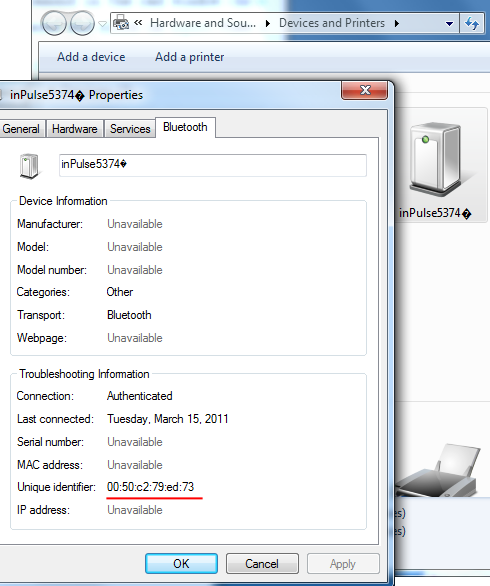
Image

Author:  testswagg [ Wed Apr 20, 2011 8:24 am ]
Post subject:  Re: SDK version 1.1.2 posted

Yes, I was using a a real number in the command, not the 'x'. But it failed as I described. I just put it as 'x' when posting the message here. Thanks!

Page 1 of 1 All times are UTC - 8 hours
Powered by phpBB © 2000, 2002, 2005, 2007 phpBB Group
http://www.phpbb.com/