
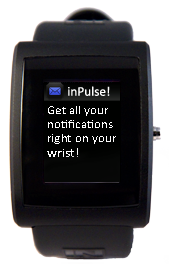
Notifications
Description
Ever wanted to see a recently received email without having to pull out your smartphone? Constantly miss calls because you can't feel your phone vibrating? Or just want to have your Twitter stream flow right across your wrist? Then Notifications app is the perfect starting point for you.
After loading Notifications app on your watch, you can set the time on your watch by issuing: "python tools/set_time.py". Then you can start the python host-side app and start forwarding info from the net to your watch! You can even download our sample Android project and get your Android smartphone connected to inPulse in a few minutes.
If you have any questions or suggestions about this app, head over to our dev forum and drop us a line.

Watch Code
#include <pulse_os.h>
#include <pulse_types.h>
#include <stddef.h>
// Time required to be considered a hold in ms
#define BUTTON_HOLD_TIME 750
// This is a text box widget that will define the bounds of where to render the text
struct PWTextBox text_box;
// Text widget that stores required information about rendering the text
// It must be initialized before it can be used
struct PWidgetTextDynamic text_widget;
// Text buffer to store text to be rendered
char text_buffer[16];
// Timer used to determine button holds
int32_t timer_id;
// Clock font color
color24_t clock_color = {199, 125, 243, 0};
// Current system minute
uint8_t current_min;
// Current system time
struct pulse_time_tm current_time;
// If bluetooth is connected
bool bt_connected;
// Index of selected item
uint8_t notification_selected;
// Number of notifications in list
uint8_t notification_list_size;
// Draws all notifications when screen is initialized
bool notification_list_first_draw;
//ID of selected notification in list
PulseNotificationId notification_id;
// Types of screens
typedef enum Screen
{
SCREEN_CLOCK,
SCREEN_NOTIFICATION_LIST,
SCREEN_NOTIFICATION_READ
} Screen;
// Current screen being displayed
Screen current_screen;
void print_time_into_text_buffer()
{
uint32_t hour = current_time.tm_hour;
if(hour > 12)
hour -= 12;
else if(hour == 0)
hour = 12;
sprintf(text_buffer, "%d:%02d", hour, current_time.tm_min);
}
// Render clock text and draw to screen
void render_clock(color24_t clock_color)
{
// Initialize the text box parameters
text_box.top = 10;
text_box.right = SCREEN_WIDTH;
text_box.left = 0;
text_box.bottom = SCREEN_HEIGHT;
// Configure the text style
// We want it to be centered both vertically and horizontally in the text box
// and to truncate any text if it won't fit in the text box
enum PWTextStyle style = (PWTS_TRUNCATE | PWTS_CENTER | PWTS_VERTICAL_CENTER);
// Initialize the text widget
pulse_init_dynamic_text_widget(&text_widget, text_buffer, FONT_GOOD_TIMES_26, clock_color, style);
// Print the time from the RTC (real time clock) in to the text buffer
print_time_into_text_buffer();
// Set font resource for clock
text_widget.font.resource_id = FONT_GOOD_TIMES_26;
// Set the font color to be psuedo-random
text_widget.font.color = clock_color;
// Render the text in the text box area
pulse_render_text(&text_box, &text_widget);
}
// Gets the notification based on the id and prints the messages to the screen
void handle_pulse_protocol_notification(PulseNotificationId id)
{
current_screen = SCREEN_NOTIFICATION_READ;
pulse_blank_canvas();
struct PulseNotification *notification = pulse_get_notification(id);
char body_text[150];
// Set font and color
text_widget.font.resource_id = FONT_PX_SANS_NOUVEAUX_8;
text_widget.font.color = COLOR_WHITE24;
// Render and draw header
pulse_draw_image(IMAGE_FULLSCREEN_EMAIL, 0, 0);
text_box.top = 5;
text_box.right = SCREEN_WIDTH;
text_box.left = 28;
text_box.bottom = 20;
enum PWTextStyle style = PWTS_TRUNCATE;
pulse_init_dynamic_text_widget(&text_widget, text_buffer, FONT_PX_SANS_NOUVEAUX_8, COLOR_WHITE24, style);
sprintf(text_buffer, "%s", notification->sender);
pulse_render_text(&text_box, &text_widget);
// Render and draw body
text_box.top = 28;
text_box.right = SCREEN_WIDTH;
text_box.left = 0;
text_box.bottom = SCREEN_HEIGHT;
style = PWTS_WRAP_AT_SPACE;
pulse_init_dynamic_text_widget(&text_widget, body_text, FONT_PX_SANS_NOUVEAUX_8, COLOR_WHITE24, style);
sprintf(body_text, "%s", notification->body);
pulse_render_text(&text_box, &text_widget);
}
// Shows the most recent notifications
void latest_notifications_screen(uint8_t index)
{
// Create an array to hold the PulseNotificationIds
PulseNotificationId latest_notifications[MAX_NOTIFICATIONS_PER_LIST];
// Call a function to populate the array
pulse_get_notification_list_by_type(PNT_ALL, latest_notifications);
// Get size of the list
for(int i = 0; i < MAX_NOTIFICATIONS_PER_LIST; i++)
{
if (latest_notifications[i] == NULL)
{
break;
}
notification_list_size = i + 1;
}
// Draw screen
if(notification_list_size != 0)
{
// Screen initialized for first time
if(notification_list_first_draw)
{
pulse_blank_canvas();
notification_list_first_draw = false;
for(int i = 0; i < notification_list_size; i++)
{
struct PulseNotification * list_item = pulse_get_notification(latest_notifications[i]);
// Draw item icon
if(i == index)
{
pulse_draw_image(IMAGE_MSGLIST_EMAIL_GLOW, 0, i * 16);
notification_id = latest_notifications[i];
}
else
{
pulse_draw_image(IMAGE_MSGLIST_EMAIL_NOGLOW, 0, i * 16);
}
// Print item sender
draw_notification_list_item_header(i, list_item->sender);
}
}
else
{
// Only redraw current selected and previously selected notifications
if(notification_list_size > 1)
{
struct PulseNotification * list_item;
uint8_t notification_previously_selected = notification_selected - 1;
if(notification_previously_selected == 0xFF)
{
notification_previously_selected = notification_list_size - 1;
}
// Highlight and redraw new selected item
list_item = pulse_get_notification(latest_notifications[notification_selected]);
pulse_draw_image(IMAGE_MSGLIST_EMAIL_GLOW, 0, notification_selected * 16);
draw_notification_list_item_header(notification_selected, list_item->sender);
notification_id = latest_notifications[notification_selected];
// Unhighlight and redraw previously selected item
list_item = pulse_get_notification(latest_notifications[notification_previously_selected]);
pulse_draw_image(IMAGE_MSGLIST_EMAIL_NOGLOW, 0, notification_previously_selected * 16);
draw_notification_list_item_header(notification_previously_selected, list_item->sender);
}
}
}
else
{
pulse_blank_canvas();
printf("No notifications");
}
}
// Prints the sender of a notification list item
void draw_notification_list_item_header(uint8_t index, char item_header[])
{
text_box.top = index * 16 + 3;
text_box.right = SCREEN_WIDTH;
text_box.left = 18;
text_box.bottom = (index + 1) * 16;
enum PWTextStyle style = PWTS_TRUNCATE;
pulse_init_dynamic_text_widget(&text_widget, text_buffer, FONT_PX_SANS_NOUVEAUX_8, COLOR_WHITE24, style);
sprintf(text_buffer, "%s", item_header);
pulse_render_text(&text_box, &text_widget);
}
// Redraw bluetooth icon
void update_bluetooth_icon(bool connected)
{
if(connected)
{
pulse_set_draw_window(0, 0, 19, 19);
for(int i = 0; i < 400; i++)
{
pulse_draw_point24(COLOR_BLACK24);
}
}
else
{
pulse_draw_image(IMAGE_BLUETOOTH_NO, 0, 0);
}
}
void return_to_clock_screen()
{
pulse_blank_canvas();
current_screen = SCREEN_CLOCK;
render_clock(clock_color);
update_bluetooth_icon(bt_connected);
}
// This function is called once after the watch has booted up
// and the OS has loaded
void main_app_init()
{
current_screen = SCREEN_CLOCK;
bt_connected = false;
notification_list_size = 0;
// Draw clock
render_clock(clock_color);
// Draw bluetooth status icon
update_bluetooth_icon(bt_connected);
// Handles new notifications
pulse_register_callback(ACTION_NEW_PULSE_PROTOCOL_NOTIFICATION, &handle_pulse_protocol_notification);
}
void main_app_handle_button_down()
{
if(current_screen == SCREEN_CLOCK)
{
current_screen = SCREEN_NOTIFICATION_LIST;
notification_list_first_draw = true;
notification_selected = 0xFF;
}
else if(current_screen == SCREEN_NOTIFICATION_LIST)
{
if(notification_list_size == 0)
{
return_to_clock_screen();
}
else
{
// Set timer for button hold
timer_id = pulse_register_timer(BUTTON_HOLD_TIME, &handle_pulse_protocol_notification, notification_id);
}
}
else
{
return_to_clock_screen();
}
}
void main_app_handle_button_up()
{
if(current_screen == SCREEN_NOTIFICATION_LIST)
{
// Button was not a hold
pulse_cancel_timer(&timer_id);
// Select next message in list
notification_selected++;
if(notification_selected == notification_list_size)
{
notification_selected = 0;
}
// Update screen
latest_notifications_screen(notification_selected);
}
}
// Main loop. This function is called frequently.
// No blocking calls are allowed in this function or else the watch will reset.
// The inPulse watchdog timer will kick in after 5 seconds if a blocking
// call is made.
void main_app_loop()
{
pulse_get_time_date(¤t_time);
if(current_screen == SCREEN_CLOCK)
{
// Update once a minute
if(current_min != current_time.tm_min)
{
current_min = current_time.tm_min;
pulse_blank_canvas();
// Draw clock
render_clock(clock_color);
update_bluetooth_icon(bt_connected);
}
}
}
// This function is called whenever the processor is about to sleep (to conserve power)
// The sleep functionality is scheduled with pulse_update_power_down_timer(uint32_t)
void main_app_handle_doz()
{
}
void main_app_handle_hardware_update(enum PulseHardwareEvent event)
{
switch(event) {
case BLUETOOTH_CONNECTED:
bt_connected = true;
break;
case BLUETOOTH_DISCONNECTED:
bt_connected = false;
break;
}
if(current_screen == SCREEN_CLOCK)
{
update_bluetooth_icon(bt_connected);
}
}
#include <pulse_types.h>
#include <stddef.h>
// Time required to be considered a hold in ms
#define BUTTON_HOLD_TIME 750
// This is a text box widget that will define the bounds of where to render the text
struct PWTextBox text_box;
// Text widget that stores required information about rendering the text
// It must be initialized before it can be used
struct PWidgetTextDynamic text_widget;
// Text buffer to store text to be rendered
char text_buffer[16];
// Timer used to determine button holds
int32_t timer_id;
// Clock font color
color24_t clock_color = {199, 125, 243, 0};
// Current system minute
uint8_t current_min;
// Current system time
struct pulse_time_tm current_time;
// If bluetooth is connected
bool bt_connected;
// Index of selected item
uint8_t notification_selected;
// Number of notifications in list
uint8_t notification_list_size;
// Draws all notifications when screen is initialized
bool notification_list_first_draw;
//ID of selected notification in list
PulseNotificationId notification_id;
// Types of screens
typedef enum Screen
{
SCREEN_CLOCK,
SCREEN_NOTIFICATION_LIST,
SCREEN_NOTIFICATION_READ
} Screen;
// Current screen being displayed
Screen current_screen;
void print_time_into_text_buffer()
{
uint32_t hour = current_time.tm_hour;
if(hour > 12)
hour -= 12;
else if(hour == 0)
hour = 12;
sprintf(text_buffer, "%d:%02d", hour, current_time.tm_min);
}
// Render clock text and draw to screen
void render_clock(color24_t clock_color)
{
// Initialize the text box parameters
text_box.top = 10;
text_box.right = SCREEN_WIDTH;
text_box.left = 0;
text_box.bottom = SCREEN_HEIGHT;
// Configure the text style
// We want it to be centered both vertically and horizontally in the text box
// and to truncate any text if it won't fit in the text box
enum PWTextStyle style = (PWTS_TRUNCATE | PWTS_CENTER | PWTS_VERTICAL_CENTER);
// Initialize the text widget
pulse_init_dynamic_text_widget(&text_widget, text_buffer, FONT_GOOD_TIMES_26, clock_color, style);
// Print the time from the RTC (real time clock) in to the text buffer
print_time_into_text_buffer();
// Set font resource for clock
text_widget.font.resource_id = FONT_GOOD_TIMES_26;
// Set the font color to be psuedo-random
text_widget.font.color = clock_color;
// Render the text in the text box area
pulse_render_text(&text_box, &text_widget);
}
// Gets the notification based on the id and prints the messages to the screen
void handle_pulse_protocol_notification(PulseNotificationId id)
{
current_screen = SCREEN_NOTIFICATION_READ;
pulse_blank_canvas();
struct PulseNotification *notification = pulse_get_notification(id);
char body_text[150];
// Set font and color
text_widget.font.resource_id = FONT_PX_SANS_NOUVEAUX_8;
text_widget.font.color = COLOR_WHITE24;
// Render and draw header
pulse_draw_image(IMAGE_FULLSCREEN_EMAIL, 0, 0);
text_box.top = 5;
text_box.right = SCREEN_WIDTH;
text_box.left = 28;
text_box.bottom = 20;
enum PWTextStyle style = PWTS_TRUNCATE;
pulse_init_dynamic_text_widget(&text_widget, text_buffer, FONT_PX_SANS_NOUVEAUX_8, COLOR_WHITE24, style);
sprintf(text_buffer, "%s", notification->sender);
pulse_render_text(&text_box, &text_widget);
// Render and draw body
text_box.top = 28;
text_box.right = SCREEN_WIDTH;
text_box.left = 0;
text_box.bottom = SCREEN_HEIGHT;
style = PWTS_WRAP_AT_SPACE;
pulse_init_dynamic_text_widget(&text_widget, body_text, FONT_PX_SANS_NOUVEAUX_8, COLOR_WHITE24, style);
sprintf(body_text, "%s", notification->body);
pulse_render_text(&text_box, &text_widget);
}
// Shows the most recent notifications
void latest_notifications_screen(uint8_t index)
{
// Create an array to hold the PulseNotificationIds
PulseNotificationId latest_notifications[MAX_NOTIFICATIONS_PER_LIST];
// Call a function to populate the array
pulse_get_notification_list_by_type(PNT_ALL, latest_notifications);
// Get size of the list
for(int i = 0; i < MAX_NOTIFICATIONS_PER_LIST; i++)
{
if (latest_notifications[i] == NULL)
{
break;
}
notification_list_size = i + 1;
}
// Draw screen
if(notification_list_size != 0)
{
// Screen initialized for first time
if(notification_list_first_draw)
{
pulse_blank_canvas();
notification_list_first_draw = false;
for(int i = 0; i < notification_list_size; i++)
{
struct PulseNotification * list_item = pulse_get_notification(latest_notifications[i]);
// Draw item icon
if(i == index)
{
pulse_draw_image(IMAGE_MSGLIST_EMAIL_GLOW, 0, i * 16);
notification_id = latest_notifications[i];
}
else
{
pulse_draw_image(IMAGE_MSGLIST_EMAIL_NOGLOW, 0, i * 16);
}
// Print item sender
draw_notification_list_item_header(i, list_item->sender);
}
}
else
{
// Only redraw current selected and previously selected notifications
if(notification_list_size > 1)
{
struct PulseNotification * list_item;
uint8_t notification_previously_selected = notification_selected - 1;
if(notification_previously_selected == 0xFF)
{
notification_previously_selected = notification_list_size - 1;
}
// Highlight and redraw new selected item
list_item = pulse_get_notification(latest_notifications[notification_selected]);
pulse_draw_image(IMAGE_MSGLIST_EMAIL_GLOW, 0, notification_selected * 16);
draw_notification_list_item_header(notification_selected, list_item->sender);
notification_id = latest_notifications[notification_selected];
// Unhighlight and redraw previously selected item
list_item = pulse_get_notification(latest_notifications[notification_previously_selected]);
pulse_draw_image(IMAGE_MSGLIST_EMAIL_NOGLOW, 0, notification_previously_selected * 16);
draw_notification_list_item_header(notification_previously_selected, list_item->sender);
}
}
}
else
{
pulse_blank_canvas();
printf("No notifications");
}
}
// Prints the sender of a notification list item
void draw_notification_list_item_header(uint8_t index, char item_header[])
{
text_box.top = index * 16 + 3;
text_box.right = SCREEN_WIDTH;
text_box.left = 18;
text_box.bottom = (index + 1) * 16;
enum PWTextStyle style = PWTS_TRUNCATE;
pulse_init_dynamic_text_widget(&text_widget, text_buffer, FONT_PX_SANS_NOUVEAUX_8, COLOR_WHITE24, style);
sprintf(text_buffer, "%s", item_header);
pulse_render_text(&text_box, &text_widget);
}
// Redraw bluetooth icon
void update_bluetooth_icon(bool connected)
{
if(connected)
{
pulse_set_draw_window(0, 0, 19, 19);
for(int i = 0; i < 400; i++)
{
pulse_draw_point24(COLOR_BLACK24);
}
}
else
{
pulse_draw_image(IMAGE_BLUETOOTH_NO, 0, 0);
}
}
void return_to_clock_screen()
{
pulse_blank_canvas();
current_screen = SCREEN_CLOCK;
render_clock(clock_color);
update_bluetooth_icon(bt_connected);
}
// This function is called once after the watch has booted up
// and the OS has loaded
void main_app_init()
{
current_screen = SCREEN_CLOCK;
bt_connected = false;
notification_list_size = 0;
// Draw clock
render_clock(clock_color);
// Draw bluetooth status icon
update_bluetooth_icon(bt_connected);
// Handles new notifications
pulse_register_callback(ACTION_NEW_PULSE_PROTOCOL_NOTIFICATION, &handle_pulse_protocol_notification);
}
void main_app_handle_button_down()
{
if(current_screen == SCREEN_CLOCK)
{
current_screen = SCREEN_NOTIFICATION_LIST;
notification_list_first_draw = true;
notification_selected = 0xFF;
}
else if(current_screen == SCREEN_NOTIFICATION_LIST)
{
if(notification_list_size == 0)
{
return_to_clock_screen();
}
else
{
// Set timer for button hold
timer_id = pulse_register_timer(BUTTON_HOLD_TIME, &handle_pulse_protocol_notification, notification_id);
}
}
else
{
return_to_clock_screen();
}
}
void main_app_handle_button_up()
{
if(current_screen == SCREEN_NOTIFICATION_LIST)
{
// Button was not a hold
pulse_cancel_timer(&timer_id);
// Select next message in list
notification_selected++;
if(notification_selected == notification_list_size)
{
notification_selected = 0;
}
// Update screen
latest_notifications_screen(notification_selected);
}
}
// Main loop. This function is called frequently.
// No blocking calls are allowed in this function or else the watch will reset.
// The inPulse watchdog timer will kick in after 5 seconds if a blocking
// call is made.
void main_app_loop()
{
pulse_get_time_date(¤t_time);
if(current_screen == SCREEN_CLOCK)
{
// Update once a minute
if(current_min != current_time.tm_min)
{
current_min = current_time.tm_min;
pulse_blank_canvas();
// Draw clock
render_clock(clock_color);
update_bluetooth_icon(bt_connected);
}
}
}
// This function is called whenever the processor is about to sleep (to conserve power)
// The sleep functionality is scheduled with pulse_update_power_down_timer(uint32_t)
void main_app_handle_doz()
{
}
void main_app_handle_hardware_update(enum PulseHardwareEvent event)
{
switch(event) {
case BLUETOOTH_CONNECTED:
bt_connected = true;
break;
case BLUETOOTH_DISCONNECTED:
bt_connected = false;
break;
}
if(current_screen == SCREEN_CLOCK)
{
update_bluetooth_icon(bt_connected);
}
}