
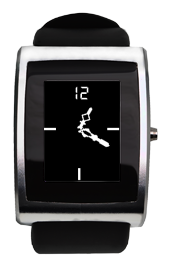
Analog Clock
Description
This app will show an analog clock screen. We've written simple python tools to allow you to quickly and easily create your very own watch face! All you need is a background image, and two watchhand images. Our script will do the rest, or you can modify the (open-source) scripts to design your own watch style.
Check out the Watchface tutorial and get started creating your own custom wristwatch in no time!
If you have any questions or suggestions about this app, head over to our dev forum and drop us a line.

Watch Code
#include <pulse_os.h>
#include <pulse_types.h>
#include <stdint.h>
uint8_t current_min;
uint8_t current_hour;
struct pulse_time_tm current_time;
void handle_button_causing_wakeup();
// This function is called once after the watch has booted up
// and the OS has loaded
void main_app_init() {
pulse_blank_canvas();
//Gets the current time from the Real Time Clock and stores the current time in two variables
pulse_get_time_date(¤t_time);
current_min = current_time.tm_min;
current_hour = current_time.tm_hour;
//Draw Background
watch_background();
//Draw Minute and Hour hands
drawMinute(current_min);
drawHour(current_hour);
//The clock will go to power saving mode in 10s. in power saving mode, Real Time Clock will still update
pulse_update_power_down_timer(10000);
// Register a callback for the woke_from_button event
pulse_register_callback(ACTION_WOKE_FROM_BUTTON, &handle_button_causing_wakeup);
}
// This function is called when the button is used to wake the processor
void handle_button_causing_wakeup()
{
//Erases the screen
pulse_blank_canvas();
//Gets current time
pulse_get_time_date(¤t_time);
current_min = current_time.tm_min;
current_hour = current_time.tm_hour;
//Prints background
watch_background();
//Draws minute hand
drawMinute(current_time.tm_min);
//Draws Hour hand
drawHour(current_time.tm_hour);
// Set the screen brightness to full
pulse_oled_set_brightness(100);
// Schedule the processor to go to sleep in 15 seconds
pulse_update_power_down_timer(15000);
}
void main_app_handle_button_down() {
}
void main_app_handle_button_up() {
}
color24_t background_color = {255, 255, 255, 0};
struct PWTextBox text_box;
char text_buffer[3];
struct PWidgetTextDynamic text_widget;
//Function that draws the background
void watch_background() {
//setting text box for the text
text_box.top = 0;
text_box.left = SCREEN_WIDTH / 2 - 10;
text_box.right = SCREEN_WIDTH / 2 + 20;
text_box.bottom = 24;
//Prints the text to the screen
sprintf(text_buffer, "12");
enum PWTextStyle style = (PWTS_TRUNCATE | PWTS_VERTICAL_CENTER);
pulse_init_dynamic_text_widget(&text_widget, text_buffer, NULL_RESOURCE0,
background_color, style);
text_widget.font.resource_id = FONT_LCD_DIGI_DS;
text_widget.font.color = background_color;
pulse_render_text(&text_box, &text_widget);
//Draws the left bar
pulse_set_draw_window(0, 61, 15, 64);
for (int i = 0; i < 64; i++) {
pulse_draw_point24(background_color);
}
//Draws the bottom bar
pulse_set_draw_window(43, 112, 46, 127);
for (int i = 0; i < 64; i++) {
pulse_draw_point24(background_color);
}
//Draws the right bar
pulse_set_draw_window(80, 61, 95, 64);
for (int i = 0; i < 64; i++) {
pulse_draw_point24(background_color);
}
}
//Draws a black square over the previous image
void erase_hand(int16_t x0, int16_t y0, int16_t width, int16_t height) {
pulse_set_draw_window(x0, y0, x0 + width + 2, y0 + height + 2);
color24_t pixel = {0, 0, 0};
for (int i = 0; i < ((width + 3)*(height + 3)); i++) {
pulse_draw_point24(pixel);
}
}
//Deletes the hand. For each hand (minute/hour) there are four subcases split per quadrants
//As the rotation of the image isn't perfect, the numbers 12,6,9,etc are fudge factors.
//If other hands are used, they might have to be modified to make it look better.
void delete_hand(int t) {
PulseResource image = t;
int16_t width, height;
pulse_dimensions_t dimensions_t = pulse_get_image_info(image);
width=dimensions_t.width;
height=dimensions_t.height;
//Q1
if (image >= IMAGE_HOUR_A && image <= IMAGE_HOUR_D) {
erase_hand(48 - 12, 64 - height + 6, width, height);
}
//Q2
if (image >= IMAGE_HOUR_E && image <= IMAGE_HOUR_G) {
erase_hand(48 - 12, 64 - 9, width, height);
}
//Q3
if (image >= IMAGE_HOUR_H && image <= IMAGE_HOUR_J) {
erase_hand(48 - width + 1, 64 - 9, width, height);
}
//Q4
if (image >= IMAGE_HOUR_K && image <= IMAGE_HOUR_L) {
erase_hand(48 - width + 2, 64 - height + 6, width, height);
}
//Q1
if (image >= IMAGE_MINUTE_A0 && image <= IMAGE_MINUTE_B5) {
erase_hand(48 - 12, 64 - height + 6, width, height);
}
//Q2
if (image >= IMAGE_MINUTE_B6 && image <= IMAGE_MINUTE_D0) {
erase_hand(48 - 12, 64 - 10, width, height);
}
//Q3
if (image >= IMAGE_MINUTE_D1 && image <= IMAGE_MINUTE_E5) {
erase_hand(48 - width + 3, 64 - 10, width, height);
}
//Q4
if (image >= IMAGE_MINUTE_E6 && image <= IMAGE_MINUTE_F9) {
erase_hand(48 - width + 3, 64 - height + 6, width, height);
}
}
//Draws the hand, same principle as above, with the same problem regarding fudge factors.
void draw_hand(int t) {
PulseResource image = t;
int16_t width, height;
pulse_dimensions_t dimensions_t = pulse_get_image_info(image);
width=dimensions_t.width;
height=dimensions_t.height;
//Q1
if (image >= IMAGE_HOUR_A && image <= IMAGE_HOUR_D) {
pulse_draw_image(image, 48 - 12, 64 - height + 6, true, COLOR_BLACK24);
}
//Q2
if (image >= IMAGE_HOUR_E && image <= IMAGE_HOUR_G) {
pulse_draw_image(image, 48 - 12, 64 - 9, true, COLOR_BLACK24);
}
//Q3
if (image >= IMAGE_HOUR_H && image <= IMAGE_HOUR_J) {
pulse_draw_image(image, 48 - width + 1, 64 - 9, true, COLOR_BLACK24);
}
//Q4
if (image >= IMAGE_HOUR_K && image <= IMAGE_HOUR_L) {
pulse_draw_image(image, 48 - width + 2, 64 - height + 6, true, COLOR_BLACK24);
}
//Q1
if (image >= IMAGE_MINUTE_A0 && image <= IMAGE_MINUTE_B5) {
pulse_draw_image(image, 48 - 12, 64 - height + 6, true, COLOR_BLACK24);
}
//Q2
if (image >= IMAGE_MINUTE_B6 && image <= IMAGE_MINUTE_D0) {
pulse_draw_image(image, 48 - 12, 64 - 10, true, COLOR_BLACK24);
}
//Q3
if (image >= IMAGE_MINUTE_D1 && image <= IMAGE_MINUTE_E5) {
pulse_draw_image(image, 48 - width + 3, 64 - 10, true, COLOR_BLACK24);
}
//Q4
if (image >= IMAGE_MINUTE_E6 && image <= IMAGE_MINUTE_F9) {
pulse_draw_image(image, 48 - width + 3, 64 - height + 6, true, COLOR_BLACK24);
}
}
//Sends the proper paramter to the erase hand function. the offset is due to
//the ordering of the images in the pulse_types.h file
void eraseMinute(int min) {
if (min == 0) {
delete_hand(59 + 13);
} else {
delete_hand(min + 13 - 1);
}
}
//Sends the proper paramter to the draw hand function. the offset is due to
//the ordering of the images in the pulse_types.h file
void drawMinute(int min) {
draw_hand(min + 13);
}
//Erases the previous minute, repaints the background, draws the minute and then the hour hand
void setMinute(int hrs, int min) {
eraseMinute(min);
watch_background();
drawMinute(min);
drawHour(hrs);
}
//Sends the proper paramter to the erase hand function. the offset is due to
//the ordering of the images in the pulse_types.h file
void eraseHour(int hrs) {
if (hrs == 0 || hrs == 12) {
delete_hand(12);
} else if (hrs < 12) {
delete_hand(hrs + 1);
} else {
delete_hand(hrs - 12 + 1);
}
}
//Sends the proper paramter to the draw hand function. the offset is due to
//the ordering of the images in the pulse_types.h file
void drawHour(int hrs) {
if (hrs < 12) {
draw_hand(hrs + 1);
} else {
draw_hand(hrs - 12 + 1);
}
}
//Erases the previous minute, repaints the background, draws the minute and then the hour hand
void setHour(int hrs, int min) {
eraseHour(hrs);
watch_background();
drawMinute(min);
drawHour(hrs);
}
// Main loop. This function is called frequently.
// No blocking calls are allowed in this function or else the watch will reset.
// The inPulse watchdog timer will kick in after 5 seconds if a blocking
// call is made.
void main_app_loop() {
//gets current time
pulse_get_time_date(¤t_time);
//if the minutes have changed, then redraw
if (current_min != current_time.tm_min) {
setMinute(current_hour, current_min);
current_min = current_time.tm_min;
}
//if the hours have changed, then redraw
if (current_hour != current_time.tm_hour) {
setHour(current_hour, current_min);
current_hour = current_time.tm_hour;
}
}
// This function is called whenever the processor is about to sleep (to conserve power)
// The sleep functionality is scheduled with pulse_update_power_down_timer(uint32_t)
void main_app_handle_doz() {
// Gradually turn down the screen brightness, creating a fade effect
for (int i = 100; i >= 0; i-=6) {
pulse_oled_set_brightness(i);
pulse_mdelay(60);
}
}
void main_app_handle_hardware_update(enum PulseHardwareEvent event) {
}
#include <pulse_types.h>
#include <stdint.h>
uint8_t current_min;
uint8_t current_hour;
struct pulse_time_tm current_time;
void handle_button_causing_wakeup();
// This function is called once after the watch has booted up
// and the OS has loaded
void main_app_init() {
pulse_blank_canvas();
//Gets the current time from the Real Time Clock and stores the current time in two variables
pulse_get_time_date(¤t_time);
current_min = current_time.tm_min;
current_hour = current_time.tm_hour;
//Draw Background
watch_background();
//Draw Minute and Hour hands
drawMinute(current_min);
drawHour(current_hour);
//The clock will go to power saving mode in 10s. in power saving mode, Real Time Clock will still update
pulse_update_power_down_timer(10000);
// Register a callback for the woke_from_button event
pulse_register_callback(ACTION_WOKE_FROM_BUTTON, &handle_button_causing_wakeup);
}
// This function is called when the button is used to wake the processor
void handle_button_causing_wakeup()
{
//Erases the screen
pulse_blank_canvas();
//Gets current time
pulse_get_time_date(¤t_time);
current_min = current_time.tm_min;
current_hour = current_time.tm_hour;
//Prints background
watch_background();
//Draws minute hand
drawMinute(current_time.tm_min);
//Draws Hour hand
drawHour(current_time.tm_hour);
// Set the screen brightness to full
pulse_oled_set_brightness(100);
// Schedule the processor to go to sleep in 15 seconds
pulse_update_power_down_timer(15000);
}
void main_app_handle_button_down() {
}
void main_app_handle_button_up() {
}
color24_t background_color = {255, 255, 255, 0};
struct PWTextBox text_box;
char text_buffer[3];
struct PWidgetTextDynamic text_widget;
//Function that draws the background
void watch_background() {
//setting text box for the text
text_box.top = 0;
text_box.left = SCREEN_WIDTH / 2 - 10;
text_box.right = SCREEN_WIDTH / 2 + 20;
text_box.bottom = 24;
//Prints the text to the screen
sprintf(text_buffer, "12");
enum PWTextStyle style = (PWTS_TRUNCATE | PWTS_VERTICAL_CENTER);
pulse_init_dynamic_text_widget(&text_widget, text_buffer, NULL_RESOURCE0,
background_color, style);
text_widget.font.resource_id = FONT_LCD_DIGI_DS;
text_widget.font.color = background_color;
pulse_render_text(&text_box, &text_widget);
//Draws the left bar
pulse_set_draw_window(0, 61, 15, 64);
for (int i = 0; i < 64; i++) {
pulse_draw_point24(background_color);
}
//Draws the bottom bar
pulse_set_draw_window(43, 112, 46, 127);
for (int i = 0; i < 64; i++) {
pulse_draw_point24(background_color);
}
//Draws the right bar
pulse_set_draw_window(80, 61, 95, 64);
for (int i = 0; i < 64; i++) {
pulse_draw_point24(background_color);
}
}
//Draws a black square over the previous image
void erase_hand(int16_t x0, int16_t y0, int16_t width, int16_t height) {
pulse_set_draw_window(x0, y0, x0 + width + 2, y0 + height + 2);
color24_t pixel = {0, 0, 0};
for (int i = 0; i < ((width + 3)*(height + 3)); i++) {
pulse_draw_point24(pixel);
}
}
//Deletes the hand. For each hand (minute/hour) there are four subcases split per quadrants
//As the rotation of the image isn't perfect, the numbers 12,6,9,etc are fudge factors.
//If other hands are used, they might have to be modified to make it look better.
void delete_hand(int t) {
PulseResource image = t;
int16_t width, height;
pulse_dimensions_t dimensions_t = pulse_get_image_info(image);
width=dimensions_t.width;
height=dimensions_t.height;
//Q1
if (image >= IMAGE_HOUR_A && image <= IMAGE_HOUR_D) {
erase_hand(48 - 12, 64 - height + 6, width, height);
}
//Q2
if (image >= IMAGE_HOUR_E && image <= IMAGE_HOUR_G) {
erase_hand(48 - 12, 64 - 9, width, height);
}
//Q3
if (image >= IMAGE_HOUR_H && image <= IMAGE_HOUR_J) {
erase_hand(48 - width + 1, 64 - 9, width, height);
}
//Q4
if (image >= IMAGE_HOUR_K && image <= IMAGE_HOUR_L) {
erase_hand(48 - width + 2, 64 - height + 6, width, height);
}
//Q1
if (image >= IMAGE_MINUTE_A0 && image <= IMAGE_MINUTE_B5) {
erase_hand(48 - 12, 64 - height + 6, width, height);
}
//Q2
if (image >= IMAGE_MINUTE_B6 && image <= IMAGE_MINUTE_D0) {
erase_hand(48 - 12, 64 - 10, width, height);
}
//Q3
if (image >= IMAGE_MINUTE_D1 && image <= IMAGE_MINUTE_E5) {
erase_hand(48 - width + 3, 64 - 10, width, height);
}
//Q4
if (image >= IMAGE_MINUTE_E6 && image <= IMAGE_MINUTE_F9) {
erase_hand(48 - width + 3, 64 - height + 6, width, height);
}
}
//Draws the hand, same principle as above, with the same problem regarding fudge factors.
void draw_hand(int t) {
PulseResource image = t;
int16_t width, height;
pulse_dimensions_t dimensions_t = pulse_get_image_info(image);
width=dimensions_t.width;
height=dimensions_t.height;
//Q1
if (image >= IMAGE_HOUR_A && image <= IMAGE_HOUR_D) {
pulse_draw_image(image, 48 - 12, 64 - height + 6, true, COLOR_BLACK24);
}
//Q2
if (image >= IMAGE_HOUR_E && image <= IMAGE_HOUR_G) {
pulse_draw_image(image, 48 - 12, 64 - 9, true, COLOR_BLACK24);
}
//Q3
if (image >= IMAGE_HOUR_H && image <= IMAGE_HOUR_J) {
pulse_draw_image(image, 48 - width + 1, 64 - 9, true, COLOR_BLACK24);
}
//Q4
if (image >= IMAGE_HOUR_K && image <= IMAGE_HOUR_L) {
pulse_draw_image(image, 48 - width + 2, 64 - height + 6, true, COLOR_BLACK24);
}
//Q1
if (image >= IMAGE_MINUTE_A0 && image <= IMAGE_MINUTE_B5) {
pulse_draw_image(image, 48 - 12, 64 - height + 6, true, COLOR_BLACK24);
}
//Q2
if (image >= IMAGE_MINUTE_B6 && image <= IMAGE_MINUTE_D0) {
pulse_draw_image(image, 48 - 12, 64 - 10, true, COLOR_BLACK24);
}
//Q3
if (image >= IMAGE_MINUTE_D1 && image <= IMAGE_MINUTE_E5) {
pulse_draw_image(image, 48 - width + 3, 64 - 10, true, COLOR_BLACK24);
}
//Q4
if (image >= IMAGE_MINUTE_E6 && image <= IMAGE_MINUTE_F9) {
pulse_draw_image(image, 48 - width + 3, 64 - height + 6, true, COLOR_BLACK24);
}
}
//Sends the proper paramter to the erase hand function. the offset is due to
//the ordering of the images in the pulse_types.h file
void eraseMinute(int min) {
if (min == 0) {
delete_hand(59 + 13);
} else {
delete_hand(min + 13 - 1);
}
}
//Sends the proper paramter to the draw hand function. the offset is due to
//the ordering of the images in the pulse_types.h file
void drawMinute(int min) {
draw_hand(min + 13);
}
//Erases the previous minute, repaints the background, draws the minute and then the hour hand
void setMinute(int hrs, int min) {
eraseMinute(min);
watch_background();
drawMinute(min);
drawHour(hrs);
}
//Sends the proper paramter to the erase hand function. the offset is due to
//the ordering of the images in the pulse_types.h file
void eraseHour(int hrs) {
if (hrs == 0 || hrs == 12) {
delete_hand(12);
} else if (hrs < 12) {
delete_hand(hrs + 1);
} else {
delete_hand(hrs - 12 + 1);
}
}
//Sends the proper paramter to the draw hand function. the offset is due to
//the ordering of the images in the pulse_types.h file
void drawHour(int hrs) {
if (hrs < 12) {
draw_hand(hrs + 1);
} else {
draw_hand(hrs - 12 + 1);
}
}
//Erases the previous minute, repaints the background, draws the minute and then the hour hand
void setHour(int hrs, int min) {
eraseHour(hrs);
watch_background();
drawMinute(min);
drawHour(hrs);
}
// Main loop. This function is called frequently.
// No blocking calls are allowed in this function or else the watch will reset.
// The inPulse watchdog timer will kick in after 5 seconds if a blocking
// call is made.
void main_app_loop() {
//gets current time
pulse_get_time_date(¤t_time);
//if the minutes have changed, then redraw
if (current_min != current_time.tm_min) {
setMinute(current_hour, current_min);
current_min = current_time.tm_min;
}
//if the hours have changed, then redraw
if (current_hour != current_time.tm_hour) {
setHour(current_hour, current_min);
current_hour = current_time.tm_hour;
}
}
// This function is called whenever the processor is about to sleep (to conserve power)
// The sleep functionality is scheduled with pulse_update_power_down_timer(uint32_t)
void main_app_handle_doz() {
// Gradually turn down the screen brightness, creating a fade effect
for (int i = 100; i >= 0; i-=6) {
pulse_oled_set_brightness(i);
pulse_mdelay(60);
}
}
void main_app_handle_hardware_update(enum PulseHardwareEvent event) {
}
Image Rotator
from PIL import Image
import Image
# Opens the hour_original image from the folder backup, rotates it and crops it. In order for the script to work, this image will have to be the image of
# the hand at the 12 position placed in an image twice its size in height, with a bit of space around the sides. For this version of the example, trial and error is your best fiend. See sample images for clarification. This is used as a hack in order to rotate
# the image around a specific point - the bottom of the arrow.
imcrop=Image.new("RGB", (1, 1))
c=1;
# There are 12 positions for the hour hand
for k in range(0, 12):
imc= Image.open("./backup/hour_original.bmp")
imc=imc.rotate(-30*k,Image.BICUBIC,True)
im_size = imc.size
x0=imc.size[0]
y0=imc.size[1]
x1=0
y1=0
#Gets the top, right, bottom, left dimensions of the actual arrow.
for i in range(0,imc.size[0]):
for j in range(0,imc.size[1]):
if (imc.getpixel((i,j))!=(0,0,0)):
if (i<x0):
x0=i
if (j<y0):
y0=j
if (i>x1):
x1=i
if (j>y1):
y1=j
imc_size = imc.size
# Crops the image appropriately. Note the appearence of the numbers 8 and 1. Both are fudge factors. The number 8 is more or less the distance
# between the center of the original image and the sides. 1 is quite a fudge factor with no actual origin.
if(k==0):
imcrop=imc.crop ((imc_size[0]/2-8, 0, x1, imc_size[1]/2+8))
if ((k>=1) and (k<=3)): #(imc_size[1]/2+8)
print "left:", ((imc_size[0]/2-8)), " up:",(0)," right:",(x1+2)," lower:",((imc_size[1]/2+8))
imcrop=imc.crop (((imc_size[0]/2-8), 0, (x1+2), ((imc_size[1]/2+8))))
if ((k>=4) and (k<=6)):
print "left:", ((imc_size[0]/2-8)), " up:",(imc_size[1]/2-8)," right:",(x1+1)," lower:",(imc_size[1])
imcrop=imc.crop (((imc_size[0]/2-8), imc_size[1]/2-8, x1+1, imc_size[1]))
if ((k>=7) and (k<=9)):
print "left:", (x0), " up:",(imc_size[1]/2-8)," right:",(x1)," lower:",((y1+1))
imcrop=imc.crop ((x0, (imc_size[1]/2-8), x1, (y1+1)))
if ((k>=10) and (k<=12)):
print "left:", (x0), " up:",(0)," right:",(x1)," lower:",((imc_size[1]/2+8))
imcrop=imc.crop ((x0, 0, x1, (imc_size[1]/2+8)))
imcrop.save("hour_"+chr(64+c)+".bmp")
c=c+1;
# Same process as for the hour hand
# Opens the hour_original image from the folder backup, rotates it and crops it. In order for the script to work, this image will have to be the image of
# the hand at the 12 position placed in an image twice its size in height, with a bit of space around the sides. For this version of the example, trial and error is your best fiend. See sample images for clarification. This is used as a hack in order to rotate
# the image around a specific point - the bottom of the arrow.
imcrop=Image.new("RGB", (1, 1))
# There are 60 positions for the hour hand
for k in range(0, 60):
imc= Image.open("./backup/minute_original.bmp")
imc=imc.rotate(-6*k,Image.BICUBIC,True)
im_size = imc.size
x0=imc.size[0]
y0=imc.size[1]
x1=0
y1=0
#Gets the top, right, bottom, left dimensions of the actual arrow.
for i in range(0,imc.size[0]):
for j in range(0,imc.size[1]):
if (imc.getpixel((i,j))!=(0,0,0)):
if (i<x0):
x0=i
if (j<y0):
y0=j
if (i>x1):
x1=i
if (j>y1):
y1=j
imc_size = imc.size
# Crops the image appropriately. Note the appearence of the numbers 8 and 1. Both are fudge factors. The number 8 is more or less the distance
# between the center of the original image and the sides. 1 is quite a fudge factor with no actual origin.
if(k==0):
imcrop=imc.crop (((imc_size[0]/2-8), 0, (x1), imc_size[1]/2+8))
if ((k>=1) and (k<=15)): #(imc_size[1]/2+8)
print "left:", ((imc_size[0]/2-8)), " up:",(0)," right:",(x1)," lower:",((imc_size[1]/2+8))
imcrop=imc.crop (((imc_size[0]/2-8), 0, (x1), ((imc_size[1]/2+8))))
if ((k>=16) and (k<=30)):
print "left:", ((imc_size[0]/2-8)), " up:",(imc_size[1]/2-8)," right:",(x1+1)," lower:",(imc_size[1])
imcrop=imc.crop (((imc_size[0]/2-8), imc_size[1]/2-8, x1+1, imc_size[1]))
if ((k>=31) and (k<=45)):
print "left:", (x0), " up:",(imc_size[1]/2-8)," right:",(x1)," lower:",((y1+1))
imcrop=imc.crop ((x0, (imc_size[1]/2-8), x1, (y1+1)))
if ((k>=46) and (k<=60)):
print "left:", (x0), " up:",(0)," right:",(x1)," lower:",((imc_size[1]/2+8))
imcrop=imc.crop ((x0, 0, x1, (imc_size[1]/2+8)))
imcrop.save("minute_"+chr(65+k/10)+chr(48+k%10)+".bmp")
import Image
# Opens the hour_original image from the folder backup, rotates it and crops it. In order for the script to work, this image will have to be the image of
# the hand at the 12 position placed in an image twice its size in height, with a bit of space around the sides. For this version of the example, trial and error is your best fiend. See sample images for clarification. This is used as a hack in order to rotate
# the image around a specific point - the bottom of the arrow.
imcrop=Image.new("RGB", (1, 1))
c=1;
# There are 12 positions for the hour hand
for k in range(0, 12):
imc= Image.open("./backup/hour_original.bmp")
imc=imc.rotate(-30*k,Image.BICUBIC,True)
im_size = imc.size
x0=imc.size[0]
y0=imc.size[1]
x1=0
y1=0
#Gets the top, right, bottom, left dimensions of the actual arrow.
for i in range(0,imc.size[0]):
for j in range(0,imc.size[1]):
if (imc.getpixel((i,j))!=(0,0,0)):
if (i<x0):
x0=i
if (j<y0):
y0=j
if (i>x1):
x1=i
if (j>y1):
y1=j
imc_size = imc.size
# Crops the image appropriately. Note the appearence of the numbers 8 and 1. Both are fudge factors. The number 8 is more or less the distance
# between the center of the original image and the sides. 1 is quite a fudge factor with no actual origin.
if(k==0):
imcrop=imc.crop ((imc_size[0]/2-8, 0, x1, imc_size[1]/2+8))
if ((k>=1) and (k<=3)): #(imc_size[1]/2+8)
print "left:", ((imc_size[0]/2-8)), " up:",(0)," right:",(x1+2)," lower:",((imc_size[1]/2+8))
imcrop=imc.crop (((imc_size[0]/2-8), 0, (x1+2), ((imc_size[1]/2+8))))
if ((k>=4) and (k<=6)):
print "left:", ((imc_size[0]/2-8)), " up:",(imc_size[1]/2-8)," right:",(x1+1)," lower:",(imc_size[1])
imcrop=imc.crop (((imc_size[0]/2-8), imc_size[1]/2-8, x1+1, imc_size[1]))
if ((k>=7) and (k<=9)):
print "left:", (x0), " up:",(imc_size[1]/2-8)," right:",(x1)," lower:",((y1+1))
imcrop=imc.crop ((x0, (imc_size[1]/2-8), x1, (y1+1)))
if ((k>=10) and (k<=12)):
print "left:", (x0), " up:",(0)," right:",(x1)," lower:",((imc_size[1]/2+8))
imcrop=imc.crop ((x0, 0, x1, (imc_size[1]/2+8)))
imcrop.save("hour_"+chr(64+c)+".bmp")
c=c+1;
# Same process as for the hour hand
# Opens the hour_original image from the folder backup, rotates it and crops it. In order for the script to work, this image will have to be the image of
# the hand at the 12 position placed in an image twice its size in height, with a bit of space around the sides. For this version of the example, trial and error is your best fiend. See sample images for clarification. This is used as a hack in order to rotate
# the image around a specific point - the bottom of the arrow.
imcrop=Image.new("RGB", (1, 1))
# There are 60 positions for the hour hand
for k in range(0, 60):
imc= Image.open("./backup/minute_original.bmp")
imc=imc.rotate(-6*k,Image.BICUBIC,True)
im_size = imc.size
x0=imc.size[0]
y0=imc.size[1]
x1=0
y1=0
#Gets the top, right, bottom, left dimensions of the actual arrow.
for i in range(0,imc.size[0]):
for j in range(0,imc.size[1]):
if (imc.getpixel((i,j))!=(0,0,0)):
if (i<x0):
x0=i
if (j<y0):
y0=j
if (i>x1):
x1=i
if (j>y1):
y1=j
imc_size = imc.size
# Crops the image appropriately. Note the appearence of the numbers 8 and 1. Both are fudge factors. The number 8 is more or less the distance
# between the center of the original image and the sides. 1 is quite a fudge factor with no actual origin.
if(k==0):
imcrop=imc.crop (((imc_size[0]/2-8), 0, (x1), imc_size[1]/2+8))
if ((k>=1) and (k<=15)): #(imc_size[1]/2+8)
print "left:", ((imc_size[0]/2-8)), " up:",(0)," right:",(x1)," lower:",((imc_size[1]/2+8))
imcrop=imc.crop (((imc_size[0]/2-8), 0, (x1), ((imc_size[1]/2+8))))
if ((k>=16) and (k<=30)):
print "left:", ((imc_size[0]/2-8)), " up:",(imc_size[1]/2-8)," right:",(x1+1)," lower:",(imc_size[1])
imcrop=imc.crop (((imc_size[0]/2-8), imc_size[1]/2-8, x1+1, imc_size[1]))
if ((k>=31) and (k<=45)):
print "left:", (x0), " up:",(imc_size[1]/2-8)," right:",(x1)," lower:",((y1+1))
imcrop=imc.crop ((x0, (imc_size[1]/2-8), x1, (y1+1)))
if ((k>=46) and (k<=60)):
print "left:", (x0), " up:",(0)," right:",(x1)," lower:",((imc_size[1]/2+8))
imcrop=imc.crop ((x0, 0, x1, (imc_size[1]/2+8)))
imcrop.save("minute_"+chr(65+k/10)+chr(48+k%10)+".bmp")