What's in the box
You should have received a small cardboard box in the mail from Allerta. Inside you'll find:
- inPulse Smartwatch
- microUSB cable
Guide
If you encounter any difficulty, feel free to email us on the right ->>.
Step 1 - Charge your inPulse
Plug your inPulse watch into a computer (using the supplied Micro USB cord) or use any other standard Micro USB charging cable. inPulse takes 45 minutes to charge fully, but you can get started with the rest of the setup while it's charging.
Your watch will display a 4 digit pairing code.
Step 2 - Install the inPulse Android app
Ensure that your Android phone can install apps from unknown sources (Settings -> Applications -> Check the 'Unknown Sources' box).
Download the latest and greatest inPulse App for Android from http://www.getinpulse.com/beta
Step 3 - Connect to your inPulse
Open the inPulse app.
At the top right, touch the 'Disconnected' button.
Then select your inPulse from the list. Your watch will be paired with the app until you press 'Connected'.
At the top right, touch the 'Disconnected' button.
Then select your inPulse from the list. Your watch will be paired with the app until you press 'Connected'.
Step 4 - Install the Default Notification App
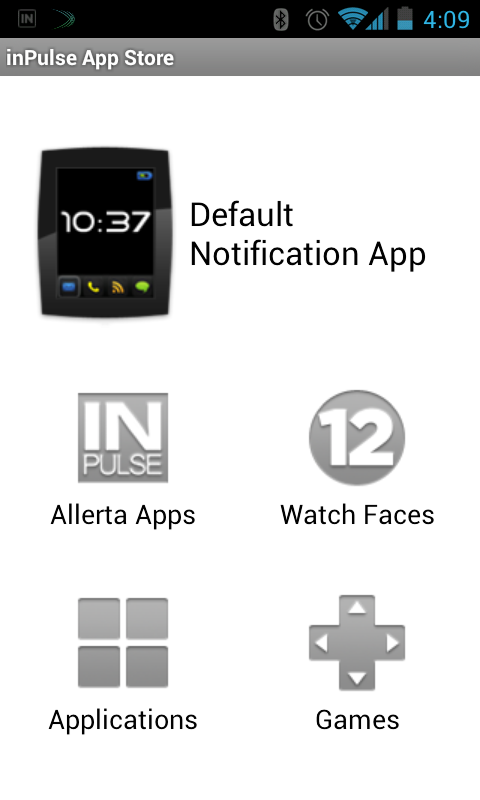 Since we release new firmware for the watch quite often, you need to update the firmware on your watch.
Inside the app, click on 'inPulse App Store
Click on 'Download Latest Notification App'
Then select 'Download and Install'
Step 5 - Wait...
Wait for the transfer to finish. It usually takes 1-2 minutes for the firmware to transfer, and 10 seconds for the watch to reboot.After the watch boots up into the notification app, return to the main screen inPulse app.
Drag up the Tools menu and select 'Send Test Notification'. Sending a test message will test the Bluetooth connection and ensure that messages are being sent to the watch correctly.
Step 6 - Configure Notifications
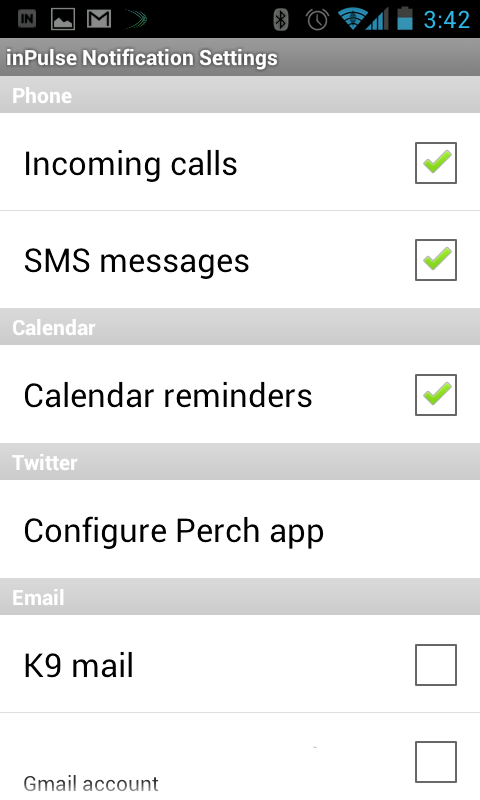 To turn on email notifications, click 'Notification Settings' from the main screen.
The inPulse app can send email from K9 mail or Gmail to your watch. You can also configure the vibration setting for each mailbox.
Something went wrong?
At any time, you can reset your watch by holding down the button until 'loading...' is displayed on screen. Then let go of the button, and the watch will reloading into factory firmware mode.From here, you can reinstall the default notification app using these instructions.