I've never been a big user of Facebook Places or Foursquare simply because I thought it was a hassle to pull out my smartphone just to checkin. Then a friend asked 'Why can't I just checkin from my inPulse watch'. Good idea, friend...good idea.
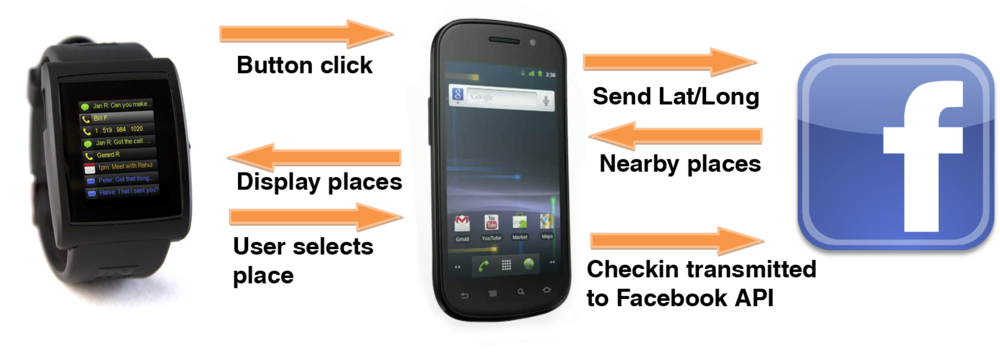
After spending a few hours getting the Android SDK to work with inPulse (don't worry, I did all the hardwork and posted the source for you to play with), I dove into the Facebook Checkin API examples. I needed Graph API permissions to publish checkins, so I registered a new app. After arguing with the Facebook API for a while longer, I figured out how to query the API for nearby locations and publish checkins. Just to give you an idea of how easy it is to talk to inPulse from your own Android apps, I've included a few code snippits below. The full Android Eclipse project is available here. You can install the APK right on your Android phone here. Explore our dev forum.getinPulse.com and share your ideas for apps there!
Remember, you can grab your own inPulse smartwatch at getinPulse.com. Start hacking your watch!
1 2 3 4 5 6 7 8 9 10 11 12 13 14 15 16 17 18 19 20 21 22 23 24 25 26 27 28 29 30 |
// Processes response from FB API, parses FB Places and transmits place names/IDs to inPulse private class IDRequestListener implements RequestListener { public void onComplete(String response, Object state) { JSONObject json = null; JSONArray jArray = null; try { // process the response here: executed in background thread try { json = Util.parseJson(response); } catch... jArray = json.getJSONArray("data"); Log.d(TAG, "jArray length: " + jArray.length()); for (int i = Math.min(7, jArray.length()); i >= 0; i--) { // Iterate through the array JSONObject eachPlace = jArray.getJSONObject(i); // The outer JSON object Log.d(TAG, "eachPlace: " + i + " " + eachPlace.toString()); ids[i] = eachPlace.getString("id"); Log.d(TAG, "place name: " + ids[i]); int trimmed = Math.min(16, eachPlace.getString("name").length()); places[i] = eachPlace.getString("name").substring(0, trimmed); // The place's name Log.d(TAG, "place name: " + places[i]); // Send each place name + ID to inPulse byte[] send = pulseprotocol.encodeNotification(0, places[i], Integer.toString(i)); mChatService.write(send); } |