|
It is currently Wed Jul 06, 2011 6:14 pm
|
View unanswered posts | View active topics
 |
|
 |
|
| Author |
Message |
|
Jon378
|
Post subject: Weather Feeder  Posted: Sat Apr 02, 2011 9:45 pm |
Joined: Sat Apr 02, 2011 9:41 pm
Posts: 1
|
|
I'm one of those people who still uses a Timex DataLink USB watch. The Weather Feeder Ap was great and I wonder if something similar could be done with the inPulse watch.
|
|

|
|
 |
|
Eric
|
Post subject: Re: Weather Feeder Posted: Tue Apr 05, 2011 5:56 pm |
Joined: Mon Feb 14, 2011 7:07 pm
Posts: 172
|
Shouldn't be too hard...which smartphone are you planning on using it with? If you download the pulse_sdk, there are smartphone code examples for both Android and Blackberry. You can use the PulseProtocol Bluetooth commands http://www.getinpulse.com/pulsesdk/blue ... ification/ to send small snippits of weather info to the watch. Post here if you have any questions! Do you have an example or picture of the weather info on your old watch? Perhaps that would be good inspiration.
_________________
---
Lead designer of inPulse
|
|
|
|
|
|
|
Johan
|
Post subject: Re: Weather Feeder Posted: Thu Apr 28, 2011 8:30 pm |
Joined: Fri Mar 04, 2011 8:54 pm
Posts: 82
|
Working on it  - First time ever developing something in android so this is fun!
_________________

Get the most out of your watch - http://www.inpulsewatch.com
|
|
|
|
|
|
|
Eric
|
Post subject: Re: Weather Feeder Posted: Thu Apr 28, 2011 8:45 pm |
Joined: Mon Feb 14, 2011 7:07 pm
Posts: 172
|
|
Did you get your replacement watch alright, Johan?
_________________
---
Lead designer of inPulse
|
|
|
|
|
|
|
Johan
|
Post subject: Re: Weather Feeder Posted: Fri Apr 29, 2011 4:08 pm |
Joined: Fri Mar 04, 2011 8:54 pm
Posts: 82
|
Eric wrote: Did you get your replacement watch alright, Johan? Just got it today - can't wait to start playing with it. I'll ping you to return my other one.
_________________
Get the most out of your watch - http://www.inpulsewatch.com
|
|
|
|
|
|
|
Johan
|
Post subject: Re: Weather Feeder Posted: Sun May 08, 2011 8:35 am |
Joined: Fri Mar 04, 2011 8:54 pm
Posts: 82
|
|
Quick status update - I had the watch display current or upcoming weather last weekend but unfortunately my watch AND my phone broke down last Sunday. I've figured out what was wrong with my phone, it seems it was overheating killing my batteries while in dev mode. Still working on getting the watch fixed...
_________________
Get the most out of your watch - http://www.inpulsewatch.com
|
|
|
|
|
|
|
Johan
|
Post subject: Re: Weather Feeder Posted: Sat May 21, 2011 9:54 pm |
Joined: Fri Mar 04, 2011 8:54 pm
Posts: 82
|
Alright I finally got my watch back and here is what I've been working on: 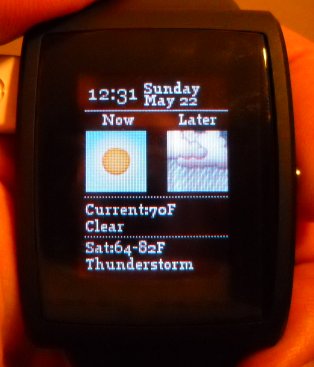 Running my weather app in test for a few days to see how well the battery life is. App will work with Android phones only.
_________________
Get the most out of your watch - http://www.inpulsewatch.com
|
|
|
|
|
|
|
Johan
|
Post subject: Re: Weather Feeder Posted: Sun May 22, 2011 6:17 am |
Joined: Fri Mar 04, 2011 8:54 pm
Posts: 82
|
|
Alright so at this point the app is unusable since I'm only getting 6-7 hours of battery life which is a bit disappointing since the app works very different than the notification app. 24 hours of battery life is the absolute acceptable minimum prior to release.
So ... looking for some help here to understand what's going wrong.
After the android app is able to establish a connection with the watch, the watch app will go to sleep and will stay inactive until you press the button. When you press the button the watch will send a command to the phone asking for a (in this case) weather update. After 10 seconds, I set the ACTION_NEW_PULSE_PROTOCOL_NOTIFICATION to NULL which doesn't allow the phone to talk to the watch any more. So my question is ... why the short battery life? Is my phone somehow still constantly communicating with the watch?
_________________
Get the most out of your watch - http://www.inpulsewatch.com
|
|
|
|
|
|
|
Eric
|
Post subject: Re: Weather Feeder Posted: Mon May 23, 2011 3:54 pm |
Joined: Mon Feb 14, 2011 7:07 pm
Posts: 172
|
|
Ah it's due to the fact that inPulse is not entering into Doze mode correctly. I'll follow up tomorrow with some more info. Looks great though!
_________________
---
Lead designer of inPulse
|
|
|
|
|
|
|
Johan
|
Post subject: Re: Weather Feeder Posted: Mon May 23, 2011 5:56 pm |
Joined: Fri Mar 04, 2011 8:54 pm
Posts: 82
|
Eric wrote: Ah it's due to the fact that inPulse is not entering into Doze mode correctly. I'll follow up tomorrow with some more info. Looks great though! That's good to hear Eric. I've been running the app for over day now on the watch without connecting my phone to the watch so I was assuming that the watch was actually entering into Doze mode correctly. Good to hear that might not be the case. Can't wait to hear what you'll come up with .
_________________
Get the most out of your watch - http://www.inpulsewatch.com
|
|
|
|
|
|
|
Eric
|
Post subject: Re: Weather Feeder Posted: Tue May 24, 2011 6:07 am |
Joined: Mon Feb 14, 2011 7:07 pm
Posts: 172
|
Ah, you're correct. Doze is being hit perfectly (since you said that it can last for a while without being connected). Have you enabled a high level sniff mode? As per http://www.getinpulse.com/pulsesdk/blue ... ification//**
* If connected by bluetooth, send the command to enable sniff mode
* (for bluetooth power saving)
*
* @param sniff_on Turn sniff mode on or off (true = on)
* @param sniff_no The sniff interval. Lower means messages are
* received more often, but uses more power.
* (400 - 2500) is a pretty usable range depending on the
* application. Sniff mode of 400 will seem near "instant"
*
* Simulator status: Not yet implemented
*/
void pulse_set_bluetooth_sniff(bool sniff_on, uint16_t sniff_no);
_________________
---
Lead designer of inPulse
|
|
|
|
|
|
|
Johan
|
Post subject: Re: Weather Feeder Posted: Tue May 24, 2011 8:36 am |
Joined: Fri Mar 04, 2011 8:54 pm
Posts: 82
|
Eric wrote: Have you enabled a high level sniff mode? Ah good remark - I'm not even touching sniff mode at this time. In essence I should just turn sniff mode off until you press the button on the watch. At that time I turn sniff mode on for 10 seconds only, which should be sufficient for the watch to communicate to the phone and back. Hopefully that will give me a 2-4 day battery life on my app . Can't wait to try this out, I should have brought my laptop to work so I could have tweaked the app over lunch!
_________________
Get the most out of your watch - http://www.inpulsewatch.com
|
|
|
|
|
|
|
Johan
|
Post subject: Re: Weather Feeder Posted: Sat May 28, 2011 7:30 am |
Joined: Fri Mar 04, 2011 8:54 pm
Posts: 82
|
|
I've been running tests all week and it seems the following two commands don't really make a difference. All week my watch died within 7 hours.
If I set sniff mode to false, shouldn't this stop draining the battery? What does the second parameter do when you set sniff mode to false?
void main_app_handle_doz()
{
pulse_set_bluetooth_sniff(false, 2500);
pulse_register_callback(ACTION_NEW_PULSE_PROTOCOL_NOTIFICATION, NULL);
}
At init, wakeup, and button_down, I set sniff to 400 to make sure bluetooth communication will actually work: pulse_set_bluetooth_sniff(true, 400);
Could it be once this is set that it ignores my pulse_set_bluetooth_sniff(false, 2500); command?
Just wondering what is going wrong here...
_________________
Get the most out of your watch - http://www.inpulsewatch.com
|
|
|
|
|
|
|
Johan
|
Post subject: Re: Weather Feeder Posted: Sun May 29, 2011 7:46 pm |
Joined: Fri Mar 04, 2011 8:54 pm
Posts: 82
|
|
It seems the trick to prolong battery life tremendously is by keeping the watch and the phone disconnected when there is nothing to communicate. While I always assumed that keeping the connection up without any traffic wouldn't really cost anything, it clearly does because my app has been running for over 24 hours now. My pulse_set_bluetooth_sniff is now always set to 400.
That means that android apps like OpenWatch could easily adjust the way they communicate with this watch to make sure they can at least run for over a day. Sure it takes a couple of seconds to get the initial connection established between the phone and the watch but that's definitely worth it to get the extended battery life. To me battery life should be at least 28 hours for a watch like this to become useful and it seems this is no longer going to be a problem.
_________________
Get the most out of your watch - http://www.inpulsewatch.com
|
|
|
|
|
|
|
Johan
|
Post subject: Re: Weather Feeder Posted: Mon May 30, 2011 6:20 am |
Joined: Fri Mar 04, 2011 8:54 pm
Posts: 82
|
jazzbassNick wrote: Nice conclusion Johan. Did you share that tidbit with the OpenWatch dev? Yep I contacted Marcel from OpenWatch yesterday.
_________________
Get the most out of your watch - http://www.inpulsewatch.com
|
|
|
|
|
|
|
Eric
|
Post subject: Re: Weather Feeder Posted: Wed Jun 01, 2011 5:45 am |
Joined: Mon Feb 14, 2011 7:07 pm
Posts: 172
|
Problem goes a bit deeper into some funky Android natively compiled code stuff. We're going to fiddle with the JNI a bit. Have you experimented with that in the past? The issue is that the Android phone itself is not switching into sniff mode, and therefore the watch is getting stuck in it as well, diminishing battery life. We need to issue some HCI commands using Bluez to the Bluetooth chipset on the Android phone to get into sniff mode ( http://www.pocketmagic.net/?p=773)...I think.
_________________
---
Lead designer of inPulse
|
|
|
|
|
|
|
Johan
|
Post subject: Re: Weather Feeder Posted: Fri Jun 10, 2011 7:15 pm |
Joined: Fri Mar 04, 2011 8:54 pm
Posts: 82
|
|
Alright so after my initial test I automated the weather app which initially resulted in a 10 hour battery life - yeah not acceptable.
2 weeks later, while tweaking params, I finally figured out what the issue was which is similar to what Eric is describing. While I was telling Android to disconnect, the watch and the phone were somehow still connected which caused the battery to dry rather quickly. For some reason Android seems to hold on to the connection for 1 to 30 minutes or longer after I request it to disconnect. I definitely want to make a suggestion that we have an SDK function to disconnect bluetooth which would make this solution super easy.
Anyway two days ago I updated my program which basically turns bluetooth off and back on after each feed which fixes this issue. It's a nasty solution but it will have to do for now. This resulted in a battery life of about 42 hours which sounds a bit better. Here is how the app works...
You basically turn the android app on and tell it to connect to your watch. The android app makes a quick connection to the watch to make sure it can find the device and informs you whether it was able to connect or not. After that you tell it to start the watch service, the android app will start sending a weather update (if one is available) every 15 minutes to your watch. We only keep both devices connected for a few seconds (during the actual data feed) to preserve battery life. Getting a battery life of 42 hours while connecting this frequently is definitely not bad. BTW I also talked to the OpenWatch guy and asked him to implement a similar technique to his app which is something he's considering. I would assume you would be able to get 2-3 days of battery life out of OpenWatch if the same technique is being applied which is a bit more interesting in comparison to 6-7 hours right now.
So whats next? While the weather watch app is finished, I still need to make my android app user friendly and make sure people have through a web interface the ability to change the parameters of the weather feed (right now it's just my zip code). Once the android app is ready and released (within 2 weeks or so), I'll start working on an update so you can also receive phone call alerts through it which should be super simple. The true goal of my app is to connect the watch to the web and allow anybody to somehow hook into it. More on this later ... first I need to clean up the android app and release it in beta so people can try it out.
_________________
Get the most out of your watch - http://www.inpulsewatch.com
|
|
|
|
|
|
|
Killer Turtle
|
Post subject: Re: Weather Feeder Posted: Sat Jun 11, 2011 7:35 am |
Joined: Sun Feb 27, 2011 8:32 pm
Posts: 138
Location: Where ever the USAF sends me.
|
|
nice work. If you need a beta tester I'm willing to.
_________________
Page ID: KTS
|
|
|
|
|
|
|
|
 |
|
 |
|
You cannot post new topics in this forum
You cannot reply to topics in this forum
You cannot edit your posts in this forum
You cannot delete your posts in this forum
You cannot post attachments in this forum
|
|