
Required Software
Java Runtime Environment (JRE)
http://www.java.com/en/download/chrome.jsp?locale=en&host=www.java.comWIDCOMM Bluetooth Drivers
http://www.broadcom.com/support/bluetooth/update.phpPython 2.6
http://www.python.org/download/releases/2.6/
* Windows support requires a bluetooth adapter with a broadcom chipset. The watch was successfully tested using the Belkin Mini Bluetooth Laptop Adapter on Windows XP and Windows 7 (IA-32). Windows 7 (x86-64) is currently not supported, but will be implemented soon. Sign up for the mailing list for more info.
Instructions
The Logical Link Control and Adaptation Protocol (L2CAP) is used by the PC to send and receive data from the watch. Running an L2CAP server is required in windows as this functionality is not natively available.
Running the L2CAP Server
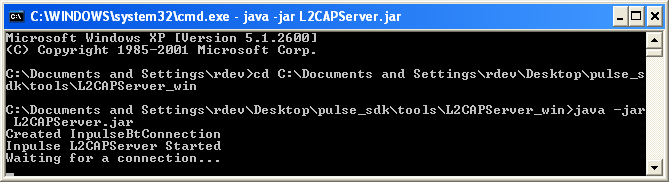
Open a command prompt and navigate to \pulse_sdk\tools\L2CAPServer
| cd ...\pulse_sdk\tools\L2CAPServer |
Launch the java application L2CAPServer.jar
| java -jar L2CAPServer.jar |
 |
Finding the Watch's Bluetooth Address
Open My Bluetooth Places and click on “View devices in range” in the Bluetooth Tasks menu. The device will appear in a list indicating its friendly name, bluetooth address and connected status.

Compiling and Transferring an App Using the Cloud Compiler
In a terminal navigate to \pulse_sdk
| cd …\pulse_sdk |
Run the python script compileandload.py to compile and transfer the app to the watch.
The -c flag is used to only compile the app.
| C:\Python26\python.exe compileandload.py -c |
The -d flag specifies the device bluetooth address and will transfer the app.
| C:\Python26\python.exe compileandload.py -d 12:34:56:78:9A:BC |
The -r flag loads resources from the SDK directory.
| C:\Python26\python.exe compileandload.py -d 12:34:56:78:9A:BC -r |
The -l flag locates a firmware file to send that is not located in the SDK.
| C:\Python26\python.exe compileandload.py -d 12:34:56:78:9A:BC -l …/app.bin |
The -f flag locates a resource file to send that is not located in the SDK. Use with -r.
| C:\Python26\python.exe compileandload.py -d 12:34:56:78:9A:BC -f …/resources.bin |
The -n flag will send the blackberry notifications app to the watch.
| C:\Python26\python.exe compileandload.py -d 12:34:56:78:9A:BC -n |
Sending a Test Message
* Test messages may not appear on the screen depending on the app, but will trigger a vibration when received by the watch.
In a new command prompt navigate to \pulse_sdk\tools
| cd ...\pulse_sdk\tools |
Run the python script send_test_msg.py passing in the bluetooth address. Message text can optionally be sent by passing the -m flag and a string in quotes following the bluetooth address.
| C:\Python26\python.exe send_test_msg.py 12:34:56:78:9a:bc -m "some string" |