
Required Software
LightBlue
Using a terminal install the LightBlue library.
| sudo apt-get install python-lightblue |
PyBluez
Using a terminal install the PyBluez library.
| sudo apt-get install python-bluez |
Instructions
Finding the Watch's Bluetooth Address
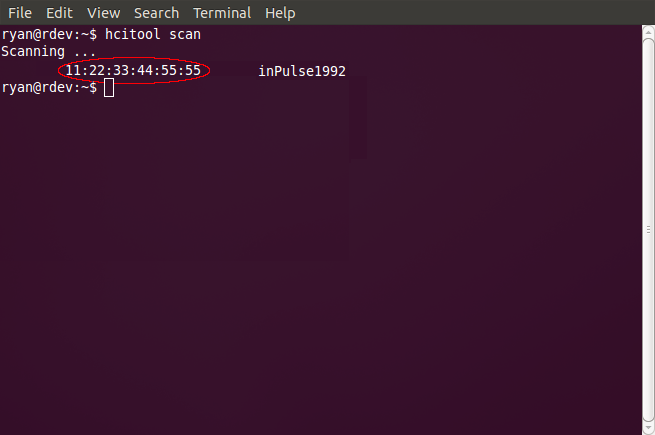
In a terminal search for nearby bluetooth devices by performing a hcitool scan. This will generate a list of discovered bluetooth devices displaying each device's friendly name and bluetooth address.
| hcitool scan |
Compiling and Transferring an App Using the Cloud Compiler
*Apps can also be compiled locally on linux (and linux VM) for developers without an internet connection or behind a strict firewall. Refer to the local compiling page for more information.
In a terminal navigate to /pulse_sdk
| cd …/pulse_sdk |
Run the python script compileandload.py to compile and transfer the app to the watch.
The -c flag is used to only compile the app.
| python compileandload.py -c |
The -d flag specifies the device bluetooth address and will transfer the app.
| python compileandload.py -d 12:34:56:78:9A:BC |
The -r flag loads resources from the SDK directory. If called with the -f flag, it will specify that file as a resource file.
| python compileandload.py -d 12:34:56:78:9A:BC -r |
The -l flag locates a firmware file to send that is not located in the SDK.
| python compileandload.py -d 12:34:56:78:9A:BC -l …/app.bin |
The -f flag locates a resource file to send that is not located in the SDK. Use with -r.
| python compileandload.py -d 12:34:56:78:9A:BC -f .../resources.bin -r |
The -n flag will send the blackberry notifications app to the watch.
| python compileandload.py -d 12:34:56:78:9A:BC -n |
Sending a Test Message
* Test messages may not appear on the screen depending on the app, but will trigger a vibration when received by the watch.
In a terminal navigate to /pulse_sdk/tools
| cd …/pulse_sdk/tools |
Run the python script send_test_msg.py passing in the bluetooth address. Message text can optionally be sent by passing the -m flag and a string in quotes following the bluetooth address.
| python send_test_msg.py 12:34:56:78:9A:BC -m "some string" |
Advanced users: Compiling Locally
If you would like to compile your watchapp on your local machine, we have released instructions on setting up a cross-compiling environment. Please visit local compiling guide for more infomation.