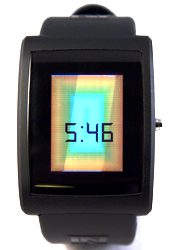
Psychedelic Clock
Description
This app prints the current time over a dynamic pulsating psychedelic background. The button is used to toggle between normal and sleep modes. It is crazy cool and we really need a video to describe it better. And here it is:
If you have any questions or suggestions about this app, head over to our dev forum and drop us a line.

Watch Code
#include <pulse_os.h>
#include <pulse_types.h>
// This is a text box widget that will define the bounds of where to render the text
struct PWTextBox text_box;
// Text widget that stores required information about rendering the text
// It must be initialized before it can be used
struct PWidgetTextDynamic text_widget;
// Text buffer to store text to be rendered
char text_buffer[16];
color24_t bg_color = {255, 0, 0, 0};
void psychedlic_background()
{
for(int i = 0; i < SCREEN_WIDTH / 2; i++)
{
pulse_set_draw_window(i, i, SCREEN_WIDTH - 1 - i, i);
for(int n = i; n < SCREEN_WIDTH - i; n++)
{
pulse_draw_point24(bg_color);
}
pulse_set_draw_window(i, SCREEN_HEIGHT - 1 - i, SCREEN_WIDTH - 1 - i, SCREEN_HEIGHT - 1 - i);
for(int n = i; n < SCREEN_WIDTH - i; n++)
{
pulse_draw_point24(bg_color);
}
pulse_set_draw_window(i, i + 1, i, SCREEN_HEIGHT - 2 - i);
for(int n = i; n < SCREEN_HEIGHT - 1 - i; n++)
{
pulse_draw_point24(bg_color);
}
pulse_set_draw_window(SCREEN_WIDTH - 1 - i, i + 1, SCREEN_WIDTH - 1 - i, SCREEN_HEIGHT - 2 - i);
for(int n = i; n < SCREEN_HEIGHT - 1 - i; n++)
{
pulse_draw_point24(bg_color);
}
cycle_color(&bg_color, 17);
}
}
// Change color to next color on RGB color wheel
// 255 should be a multiple of step to function as intended
void cycle_color(color24_t * color, uint8_t step)
{
if(color->blue == 0 && color->green != 255)
{
color->green += step;
}
else if(color->green == 255 && color->red != 0)
{
color->red -= step;
}
else if(color->red == 0 && color->blue != 255)
{
color->blue += step;
}
else if(color->blue == 255 && color->green != 0)
{
color->green -= step;
}
else if(color->green == 0 && color->red != 255)
{
color->red += step;
}
else if(color->red == 255 && color->blue != 0)
{
color->blue -= step;
}
}
void print_time_into_text_buffer()
{
struct pulse_time_tm current_time;
pulse_get_time_date(¤t_time);
uint32_t hour = current_time.tm_hour;
if(hour == 0)
{
hour = 12;
}
else if(hour > 12)
{
hour -= 12;
}
sprintf(text_buffer, "%d:%02d", current_time.tm_hour, current_time.tm_min);
}
void draw_clock()
{
// Initialize the text box parameters
text_box.top = 10;
text_box.right = SCREEN_WIDTH;
text_box.left = 0;
text_box.bottom = SCREEN_HEIGHT;
// Configure the text style
// We want it to be centered both vertically and horizontally in the text box
// and to truncate any text if it won't fit in the text box
enum PWTextStyle style = (PWTS_TRUNCATE | PWTS_CENTER | PWTS_VERTICAL_CENTER);
// Initialize the text widget
pulse_init_dynamic_text_widget(&text_widget, text_buffer, FONT_CLOCKOPIA_32, COLOR_BLACK24, style);
// Print the time from the RTC (real time clock) in to the text buffer
print_time_into_text_buffer();
text_widget.font.resource_id = FONT_CLOCKOPIA_32;
// Set the font color to be psuedo-random
text_widget.font.color = COLOR_BLACK24;
// Render the text in the text box area
pulse_render_text(&text_box, &text_widget);
}
// This function is called once after the watch has booted up
// and the OS has loaded
void main_app_init()
{
}
void main_app_handle_button_down()
{
pulse_update_power_down_timer(100);
}
void main_app_handle_button_up()
{
}
// Main loop. This function is called frequently.
// No blocking calls are allowed in this function or else the watch will reset.
// The inPulse watchdog timer will kick in after 5 seconds if a blocking
// call is made.
void main_app_loop()
{
psychedlic_background();
draw_clock();
}
// This function is called whenever the processor is about to sleep (to conserve power)
// The sleep functionality is scheduled with pulse_update_power_down_timer(uint32_t)
void main_app_handle_doz()
{
}
void main_app_handle_hardware_update(enum PulseHardwareEvent event)
{
}
#include <pulse_types.h>
// This is a text box widget that will define the bounds of where to render the text
struct PWTextBox text_box;
// Text widget that stores required information about rendering the text
// It must be initialized before it can be used
struct PWidgetTextDynamic text_widget;
// Text buffer to store text to be rendered
char text_buffer[16];
color24_t bg_color = {255, 0, 0, 0};
void psychedlic_background()
{
for(int i = 0; i < SCREEN_WIDTH / 2; i++)
{
pulse_set_draw_window(i, i, SCREEN_WIDTH - 1 - i, i);
for(int n = i; n < SCREEN_WIDTH - i; n++)
{
pulse_draw_point24(bg_color);
}
pulse_set_draw_window(i, SCREEN_HEIGHT - 1 - i, SCREEN_WIDTH - 1 - i, SCREEN_HEIGHT - 1 - i);
for(int n = i; n < SCREEN_WIDTH - i; n++)
{
pulse_draw_point24(bg_color);
}
pulse_set_draw_window(i, i + 1, i, SCREEN_HEIGHT - 2 - i);
for(int n = i; n < SCREEN_HEIGHT - 1 - i; n++)
{
pulse_draw_point24(bg_color);
}
pulse_set_draw_window(SCREEN_WIDTH - 1 - i, i + 1, SCREEN_WIDTH - 1 - i, SCREEN_HEIGHT - 2 - i);
for(int n = i; n < SCREEN_HEIGHT - 1 - i; n++)
{
pulse_draw_point24(bg_color);
}
cycle_color(&bg_color, 17);
}
}
// Change color to next color on RGB color wheel
// 255 should be a multiple of step to function as intended
void cycle_color(color24_t * color, uint8_t step)
{
if(color->blue == 0 && color->green != 255)
{
color->green += step;
}
else if(color->green == 255 && color->red != 0)
{
color->red -= step;
}
else if(color->red == 0 && color->blue != 255)
{
color->blue += step;
}
else if(color->blue == 255 && color->green != 0)
{
color->green -= step;
}
else if(color->green == 0 && color->red != 255)
{
color->red += step;
}
else if(color->red == 255 && color->blue != 0)
{
color->blue -= step;
}
}
void print_time_into_text_buffer()
{
struct pulse_time_tm current_time;
pulse_get_time_date(¤t_time);
uint32_t hour = current_time.tm_hour;
if(hour == 0)
{
hour = 12;
}
else if(hour > 12)
{
hour -= 12;
}
sprintf(text_buffer, "%d:%02d", current_time.tm_hour, current_time.tm_min);
}
void draw_clock()
{
// Initialize the text box parameters
text_box.top = 10;
text_box.right = SCREEN_WIDTH;
text_box.left = 0;
text_box.bottom = SCREEN_HEIGHT;
// Configure the text style
// We want it to be centered both vertically and horizontally in the text box
// and to truncate any text if it won't fit in the text box
enum PWTextStyle style = (PWTS_TRUNCATE | PWTS_CENTER | PWTS_VERTICAL_CENTER);
// Initialize the text widget
pulse_init_dynamic_text_widget(&text_widget, text_buffer, FONT_CLOCKOPIA_32, COLOR_BLACK24, style);
// Print the time from the RTC (real time clock) in to the text buffer
print_time_into_text_buffer();
text_widget.font.resource_id = FONT_CLOCKOPIA_32;
// Set the font color to be psuedo-random
text_widget.font.color = COLOR_BLACK24;
// Render the text in the text box area
pulse_render_text(&text_box, &text_widget);
}
// This function is called once after the watch has booted up
// and the OS has loaded
void main_app_init()
{
}
void main_app_handle_button_down()
{
pulse_update_power_down_timer(100);
}
void main_app_handle_button_up()
{
}
// Main loop. This function is called frequently.
// No blocking calls are allowed in this function or else the watch will reset.
// The inPulse watchdog timer will kick in after 5 seconds if a blocking
// call is made.
void main_app_loop()
{
psychedlic_background();
draw_clock();
}
// This function is called whenever the processor is about to sleep (to conserve power)
// The sleep functionality is scheduled with pulse_update_power_down_timer(uint32_t)
void main_app_handle_doz()
{
}
void main_app_handle_hardware_update(enum PulseHardwareEvent event)
{
}