
Ping Stat
Description
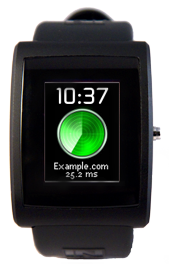
This app displays a clock and the contents of a pulseprotocol notification. This app comes with a host-side python app that pings a given domain and sends the ping information to the watch once a minute.
After loading PingStat on your watch, you can set the time on your watch by issuing: "python tools/set_time.py". Then you can start the python host-side app and ping your wrist to your hearts content!
If you have any questions or suggestions about this app, head over to our dev forum and drop us a line.

Watch Code
#include <pulse_os.h>
#include <pulse_types.h>
#include <app_resources.h>
#include <stdint.h>
struct pulse_time_tm current_time;
struct PWTextBox clock_text_box;
struct PWidgetTextDynamic clock_text_widget;
struct PWTextBox message_text_box;
struct PWidgetTextDynamic message_text_widget;
// Text buffers to store text to be rendered
char clock_text_buffer[16];
char message_text_buffer[64];
// Text styles to use for the text widgets
enum PWTextStyle clock_text_style = (PWTS_TRUNCATE | PWTS_CENTER);
enum PWTextStyle message_text_style = (PWTS_WRAP_AT_SPACE | PWTS_CENTER | PWTS_VERTICAL_CENTER);
// Forward Declaration
void handle_message(PulseNotificationId id);
void main_app_init()
{
// Draw the radar image to the screen
pulse_dimensions_t d = pulse_get_image_info(IMAGE_RADAR);
pulse_draw_image(IMAGE_RADAR, (SCREEN_WIDTH - d.width) / 2, 32);
// Put a default into the message text buffer
sprintf(message_text_buffer, "Example.com\n??? ms");
// Set up the text box positions
clock_text_box.top = 0;
clock_text_box.bottom = pulse_get_font_height(FONT_CLOCKOPIA_30);
clock_text_box.left = 0;
clock_text_box.right = SCREEN_WIDTH - 5;
message_text_box.top = 105;
message_text_box.bottom = SCREEN_HEIGHT - 1;
message_text_box.left = 0;
message_text_box.right = SCREEN_WIDTH - 1;
// Initialize the text widgets
pulse_init_dynamic_text_widget(&clock_text_widget, clock_text_buffer, FONT_CLOCKOPIA_30, COLOR_WHITE24, clock_text_style);
pulse_init_dynamic_text_widget(&message_text_widget, message_text_buffer, FONT_EASTA_10, COLOR_WHITE24, message_text_style);
// Register a callback so that we're notified of new pulse protocol notifications
// (over bluetooth)
pulse_register_callback(ACTION_NEW_PULSE_PROTOCOL_NOTIFICATION, &handle_message);
// Write the text widgets to the screen
update_time();
update_server_ping_message();
}
// Get the time and write it to a text buffer
struct pulse_time_tm current_time;
void print_time_into_text_buffer()
{
pulse_get_time_date(¤t_time);
sprintf(clock_text_buffer, "%d:%02d", current_time.tm_hour, current_time.tm_min);
}
// Print the time to the screen to and set a timer to call
// this function on the minute mark
void update_time()
{
print_time_into_text_buffer();
// Draw a black box over the text area to clear it
// There are other more effecient solutions
pulse_set_draw_window(0,0, SCREEN_WIDTH, 30);
for (int i = 0; i < 30 * SCREEN_WIDTH; i++) {
pulse_draw_point24(COLOR_BLACK24);
}
pulse_render_text(&clock_text_box, &clock_text_widget);
// Register a timer to update the time on the minute mark
pulse_register_timer(60000 - current_time.tm_sec * 1000, &update_time, 0);
}
// Write the message to the screen
void update_server_ping_message()
{
// Draw a black box over the text area to clear it
// There are other more effecient solutions
pulse_set_draw_window(0,102, SCREEN_WIDTH, SCREEN_HEIGHT);
for (int i = 0; i < 30 * SCREEN_WIDTH; i++) {
pulse_draw_point24(COLOR_BLACK24);
}
pulse_render_text(&message_text_box, &message_text_widget);
}
// This function was registered to receive pulse protocol notifications
// Write the message to the message text buffer
void handle_message(PulseNotificationId id)
{
struct PulseNotification * p = pulse_get_notification(id);
sprintf(message_text_buffer, "%s\n%s", p->body, p->sender);
dbg_printf("%s\n", message_text_buffer);
update_server_ping_message();
}
void main_app_handle_button_down()
{
}
void main_app_handle_button_up()
{
}
// Main loop. This function is called frequently.
// No blocking calls are allowed in this function or else the watch will reset.
// The inPulse watchdog timer will kick in after 5 seconds if a blocking
// call is made.
void main_app_loop()
{
}
// This function is called whenever the processor is about to sleep (to conserve power)
// The sleep functionality is scheduled with pulse_update_power_down_timer(uint32_t)
void main_app_handle_doz()
{
}
void main_app_handle_hardware_update(enum PulseHardwareEvent event)
{
}
#include <pulse_types.h>
#include <app_resources.h>
#include <stdint.h>
struct pulse_time_tm current_time;
struct PWTextBox clock_text_box;
struct PWidgetTextDynamic clock_text_widget;
struct PWTextBox message_text_box;
struct PWidgetTextDynamic message_text_widget;
// Text buffers to store text to be rendered
char clock_text_buffer[16];
char message_text_buffer[64];
// Text styles to use for the text widgets
enum PWTextStyle clock_text_style = (PWTS_TRUNCATE | PWTS_CENTER);
enum PWTextStyle message_text_style = (PWTS_WRAP_AT_SPACE | PWTS_CENTER | PWTS_VERTICAL_CENTER);
// Forward Declaration
void handle_message(PulseNotificationId id);
void main_app_init()
{
// Draw the radar image to the screen
pulse_dimensions_t d = pulse_get_image_info(IMAGE_RADAR);
pulse_draw_image(IMAGE_RADAR, (SCREEN_WIDTH - d.width) / 2, 32);
// Put a default into the message text buffer
sprintf(message_text_buffer, "Example.com\n??? ms");
// Set up the text box positions
clock_text_box.top = 0;
clock_text_box.bottom = pulse_get_font_height(FONT_CLOCKOPIA_30);
clock_text_box.left = 0;
clock_text_box.right = SCREEN_WIDTH - 5;
message_text_box.top = 105;
message_text_box.bottom = SCREEN_HEIGHT - 1;
message_text_box.left = 0;
message_text_box.right = SCREEN_WIDTH - 1;
// Initialize the text widgets
pulse_init_dynamic_text_widget(&clock_text_widget, clock_text_buffer, FONT_CLOCKOPIA_30, COLOR_WHITE24, clock_text_style);
pulse_init_dynamic_text_widget(&message_text_widget, message_text_buffer, FONT_EASTA_10, COLOR_WHITE24, message_text_style);
// Register a callback so that we're notified of new pulse protocol notifications
// (over bluetooth)
pulse_register_callback(ACTION_NEW_PULSE_PROTOCOL_NOTIFICATION, &handle_message);
// Write the text widgets to the screen
update_time();
update_server_ping_message();
}
// Get the time and write it to a text buffer
struct pulse_time_tm current_time;
void print_time_into_text_buffer()
{
pulse_get_time_date(¤t_time);
sprintf(clock_text_buffer, "%d:%02d", current_time.tm_hour, current_time.tm_min);
}
// Print the time to the screen to and set a timer to call
// this function on the minute mark
void update_time()
{
print_time_into_text_buffer();
// Draw a black box over the text area to clear it
// There are other more effecient solutions
pulse_set_draw_window(0,0, SCREEN_WIDTH, 30);
for (int i = 0; i < 30 * SCREEN_WIDTH; i++) {
pulse_draw_point24(COLOR_BLACK24);
}
pulse_render_text(&clock_text_box, &clock_text_widget);
// Register a timer to update the time on the minute mark
pulse_register_timer(60000 - current_time.tm_sec * 1000, &update_time, 0);
}
// Write the message to the screen
void update_server_ping_message()
{
// Draw a black box over the text area to clear it
// There are other more effecient solutions
pulse_set_draw_window(0,102, SCREEN_WIDTH, SCREEN_HEIGHT);
for (int i = 0; i < 30 * SCREEN_WIDTH; i++) {
pulse_draw_point24(COLOR_BLACK24);
}
pulse_render_text(&message_text_box, &message_text_widget);
}
// This function was registered to receive pulse protocol notifications
// Write the message to the message text buffer
void handle_message(PulseNotificationId id)
{
struct PulseNotification * p = pulse_get_notification(id);
sprintf(message_text_buffer, "%s\n%s", p->body, p->sender);
dbg_printf("%s\n", message_text_buffer);
update_server_ping_message();
}
void main_app_handle_button_down()
{
}
void main_app_handle_button_up()
{
}
// Main loop. This function is called frequently.
// No blocking calls are allowed in this function or else the watch will reset.
// The inPulse watchdog timer will kick in after 5 seconds if a blocking
// call is made.
void main_app_loop()
{
}
// This function is called whenever the processor is about to sleep (to conserve power)
// The sleep functionality is scheduled with pulse_update_power_down_timer(uint32_t)
void main_app_handle_doz()
{
}
void main_app_handle_hardware_update(enum PulseHardwareEvent event)
{
}
Python Script
import tools.bt_python.pulseprotocol as proto
from tools.bt_python.bt_comm import BT_Socket
from optparse import OptionParser
import sys, os, re, time
usage = """%prog [options] bt_mac_address
bt_mac_address in form 00:50:c2:xx:xx:xx
"""
parser = OptionParser(usage=usage)
parser.add_option('-d', '--domain',
default='Example.com',
help='Pick a domain to ping')
(options, args) = parser.parse_args()
if len(args) != 1:
parser.error("incorrect number of arguments")
sock = BT_Socket(sys.argv[1], 0x1001)
# This script is designed to work on Linux and hasn't been tested
# on other operating system
# Ping command expected in format:
# 64 bytes from 208.68.143.50: icmp_req=1 ttl=114 time=45.7 ms
# It should work on a mac right away, but may require slight modification to run
# on Windows
while True:
r = "".join(os.popen("ping options.domain -c 1").readlines())
print r
if re.search("64 bytes from", r):
results = r.split("time=")
result = results[1]
else:
result = "??? ms"
print options.domain
print result
# Send this to the watch as an SMS notification
# TODO: with options.domain, python seems to be sending over more than just
# the domain. It doesn't affect the output on the watch though.
sock.send(proto.sms_notification(result,options.domain, 0))
# Set the time on the watch
sock.send(proto.cmd_send_time())
# Ping again in 60 seconds
time.sleep(60)
sock.close()
from tools.bt_python.bt_comm import BT_Socket
from optparse import OptionParser
import sys, os, re, time
usage = """%prog [options] bt_mac_address
bt_mac_address in form 00:50:c2:xx:xx:xx
"""
parser = OptionParser(usage=usage)
parser.add_option('-d', '--domain',
default='Example.com',
help='Pick a domain to ping')
(options, args) = parser.parse_args()
if len(args) != 1:
parser.error("incorrect number of arguments")
sock = BT_Socket(sys.argv[1], 0x1001)
# This script is designed to work on Linux and hasn't been tested
# on other operating system
# Ping command expected in format:
# 64 bytes from 208.68.143.50: icmp_req=1 ttl=114 time=45.7 ms
# It should work on a mac right away, but may require slight modification to run
# on Windows
while True:
r = "".join(os.popen("ping options.domain -c 1").readlines())
print r
if re.search("64 bytes from", r):
results = r.split("time=")
result = results[1]
else:
result = "??? ms"
print options.domain
print result
# Send this to the watch as an SMS notification
# TODO: with options.domain, python seems to be sending over more than just
# the domain. It doesn't affect the output on the watch though.
sock.send(proto.sms_notification(result,options.domain, 0))
# Set the time on the watch
sock.send(proto.cmd_send_time())
# Ping again in 60 seconds
time.sleep(60)
sock.close()