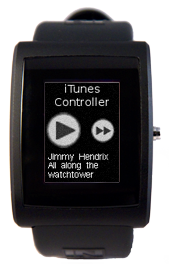
iTunes
Description
This app displays a pause/play button, a next button and the contents of a non-pulseprotocol notification. This app comes with a host-side python app that connects to the iTunes and changes the song, or plays/pauses the current one based on your button presses.
After loading iTunes to your watch, you can start the Python host-side and control your iTunes, all from your watch.
If you have any questions or suggestions about this app, head over to our dev forum and drop us a line.

Watch Code
#include <pulse_os.h>
#include <pulse_types.h>
#include <app_resources.h>
#include <stdint.h>
#include <stddef.h>
// Forward Declaration
void handle_received_bluetooth_data(const uint8_t *buffer);
//Holds the timer value for a click hold
int hold_timer_value;
//Whether itunes is currently playing a song
bool play;
//Whether the button was held
bool held=false;
//Whether this is a new song so it would reprint the artist and name
bool new_song=true;
//Color of the text
color24_t text_color = {255, 255, 255, 0};
struct PWTextBox text_box;
char text_buffer[220];
struct PWidgetTextDynamic text_widget;
//Will draw the title of the app
void draw_title()
{
pulse_draw_image(IMAGE_TITLE,0,0);
}
//Draws the Play/Pause buttons
void draw_play(PulseResource button)
{
pulse_draw_image(button,3,38);
}
//Draws the next button
void draw_next(PulseResource button)
{
pulse_draw_image(button,60,46);
}
// This function is called once after the watch has booted up
// and the OS has loaded
void main_app_init()
{
// Registers a callback function to handle non pulse-protocol bluetooth data received
pulse_register_callback(ACTION_HANDLE_NON_PULSE_PROTOCOL_BLUETOOTH_DATA, &handle_received_bluetooth_data);
draw_title();
draw_play(IMAGE_PLAY);
draw_next(IMAGE_NEXT);
// When the Pythoinscript starts on the comuter side, it will pause the song in order to "synch"
// the button with the watch
play=false;
}
//In the case of a click hold it will vibrate for 75ms and send the value of command to the watch
void click_hold(int command)
{
pulse_vibe_on();
pulse_mdelay(75);
pulse_vibe_off();
send_bluetooth_response(command);
held=true;
}
// When the button is down, it will start the click hold timer. If the timer reaches 500ms, the click_hold
// function will be called. If the button is releeased before the timer expires then the timer will
// get cancelled in main_app_handle_button_up()
void main_app_handle_button_down()
{
hold_timer_value=pulse_register_timer(500, &click_hold, 0);
}
// If the click was a click-hold, then either draw the play or the pause button as appropriate.
// and send the command to PlayPause to the iTunes
void main_app_handle_button_up()
{
if(!held) {
if(play) {
draw_play(IMAGE_PLAY);
play=false;
} else {
draw_play(IMAGE_PAUSE);
play=true;
}
pulse_cancel_timer(&hold_timer_value);
send_bluetooth_response(1);
}
held=false;
}
// Main loop. This function is called frequently.
// No blocking calls are allowed in this function or else the watch will reset.
// The inPulse watchdog timer will kick in after 5 seconds if a blocking
// call is made.
void main_app_loop()
{
}
// This function is called whenever the processor is about to sleep (to conserve power)
// The sleep functionality is scheduled with pulse_update_power_down_timer(uint32_t)
void main_app_handle_doz()
{
}
// Prints a status message to the screen when bluetooth is connected or disconnected
void main_app_handle_hardware_update(enum PulseHardwareEvent event)
{
switch(event) {
case BLUETOOTH_CONNECTED:
//printf("BT Connected\n");
break;
case BLUETOOTH_DISCONNECTED:
// printf("BT Disconnected\n");
break;
}
}
// Send back a short response to the host that initiated the bluetooth connection
void send_bluetooth_response(int command)
{
pulse_send_bluetooth_int(command);
}
// Prints the the bluetooth data received to the screen, in our case being the artist name and song name
void handle_received_bluetooth_data(const uint8_t *buffer)
{
//if the song is new, as in if the next button was pressed
if(new_song) {
// Erase the old information by drawing a black box on top of it
pulse_set_draw_window(5, 88, SCREEN_WIDTH, 125);
for (int i = 0; i < 3367; i++) {
pulse_draw_point24(COLOR_BLACK24);
}
//Set up the text box for the artist name
text_box.top = 88;
text_box.left = 5;
text_box.right = SCREEN_WIDTH;
text_box.bottom = 98;
//Prints the text to the screen
sprintf(text_buffer, buffer);
enum PWTextStyle style = (PWTS_TRUNCATE | PWTS_VERTICAL_CENTER);
pulse_init_dynamic_text_widget(&text_widget, text_buffer, FONT_CANDC_12, text_color, style);
text_widget.font.resource_id = FONT_CANDC_12;
text_widget.font.color = text_color;
pulse_render_text(&text_box, &text_widget);
//sets the new_song check variable to false
new_song=false;
} else {
//if the song isn't new (as in when the artist was printed but not the name), print the name
text_box.top = 98;
text_box.left = 5;
text_box.right = SCREEN_WIDTH;
text_box.bottom = 123;
sprintf(text_buffer, buffer);
enum PWTextStyle style = (PWTS_WRAP_AT_SPACE | PWTS_VERTICAL_CENTER);
pulse_init_dynamic_text_widget(&text_widget, text_buffer, FONT_CANDC_12, text_color, style);
text_widget.font.resource_id = FONT_CANDC_12;
text_widget.font.color = text_color;
pulse_render_text(&text_box, &text_widget);
//sets the new_song check variable to true
new_song=true;
}
}
#include <pulse_types.h>
#include <app_resources.h>
#include <stdint.h>
#include <stddef.h>
// Forward Declaration
void handle_received_bluetooth_data(const uint8_t *buffer);
//Holds the timer value for a click hold
int hold_timer_value;
//Whether itunes is currently playing a song
bool play;
//Whether the button was held
bool held=false;
//Whether this is a new song so it would reprint the artist and name
bool new_song=true;
//Color of the text
color24_t text_color = {255, 255, 255, 0};
struct PWTextBox text_box;
char text_buffer[220];
struct PWidgetTextDynamic text_widget;
//Will draw the title of the app
void draw_title()
{
pulse_draw_image(IMAGE_TITLE,0,0);
}
//Draws the Play/Pause buttons
void draw_play(PulseResource button)
{
pulse_draw_image(button,3,38);
}
//Draws the next button
void draw_next(PulseResource button)
{
pulse_draw_image(button,60,46);
}
// This function is called once after the watch has booted up
// and the OS has loaded
void main_app_init()
{
// Registers a callback function to handle non pulse-protocol bluetooth data received
pulse_register_callback(ACTION_HANDLE_NON_PULSE_PROTOCOL_BLUETOOTH_DATA, &handle_received_bluetooth_data);
draw_title();
draw_play(IMAGE_PLAY);
draw_next(IMAGE_NEXT);
// When the Pythoinscript starts on the comuter side, it will pause the song in order to "synch"
// the button with the watch
play=false;
}
//In the case of a click hold it will vibrate for 75ms and send the value of command to the watch
void click_hold(int command)
{
pulse_vibe_on();
pulse_mdelay(75);
pulse_vibe_off();
send_bluetooth_response(command);
held=true;
}
// When the button is down, it will start the click hold timer. If the timer reaches 500ms, the click_hold
// function will be called. If the button is releeased before the timer expires then the timer will
// get cancelled in main_app_handle_button_up()
void main_app_handle_button_down()
{
hold_timer_value=pulse_register_timer(500, &click_hold, 0);
}
// If the click was a click-hold, then either draw the play or the pause button as appropriate.
// and send the command to PlayPause to the iTunes
void main_app_handle_button_up()
{
if(!held) {
if(play) {
draw_play(IMAGE_PLAY);
play=false;
} else {
draw_play(IMAGE_PAUSE);
play=true;
}
pulse_cancel_timer(&hold_timer_value);
send_bluetooth_response(1);
}
held=false;
}
// Main loop. This function is called frequently.
// No blocking calls are allowed in this function or else the watch will reset.
// The inPulse watchdog timer will kick in after 5 seconds if a blocking
// call is made.
void main_app_loop()
{
}
// This function is called whenever the processor is about to sleep (to conserve power)
// The sleep functionality is scheduled with pulse_update_power_down_timer(uint32_t)
void main_app_handle_doz()
{
}
// Prints a status message to the screen when bluetooth is connected or disconnected
void main_app_handle_hardware_update(enum PulseHardwareEvent event)
{
switch(event) {
case BLUETOOTH_CONNECTED:
//printf("BT Connected\n");
break;
case BLUETOOTH_DISCONNECTED:
// printf("BT Disconnected\n");
break;
}
}
// Send back a short response to the host that initiated the bluetooth connection
void send_bluetooth_response(int command)
{
pulse_send_bluetooth_int(command);
}
// Prints the the bluetooth data received to the screen, in our case being the artist name and song name
void handle_received_bluetooth_data(const uint8_t *buffer)
{
//if the song is new, as in if the next button was pressed
if(new_song) {
// Erase the old information by drawing a black box on top of it
pulse_set_draw_window(5, 88, SCREEN_WIDTH, 125);
for (int i = 0; i < 3367; i++) {
pulse_draw_point24(COLOR_BLACK24);
}
//Set up the text box for the artist name
text_box.top = 88;
text_box.left = 5;
text_box.right = SCREEN_WIDTH;
text_box.bottom = 98;
//Prints the text to the screen
sprintf(text_buffer, buffer);
enum PWTextStyle style = (PWTS_TRUNCATE | PWTS_VERTICAL_CENTER);
pulse_init_dynamic_text_widget(&text_widget, text_buffer, FONT_CANDC_12, text_color, style);
text_widget.font.resource_id = FONT_CANDC_12;
text_widget.font.color = text_color;
pulse_render_text(&text_box, &text_widget);
//sets the new_song check variable to false
new_song=false;
} else {
//if the song isn't new (as in when the artist was printed but not the name), print the name
text_box.top = 98;
text_box.left = 5;
text_box.right = SCREEN_WIDTH;
text_box.bottom = 123;
sprintf(text_buffer, buffer);
enum PWTextStyle style = (PWTS_WRAP_AT_SPACE | PWTS_VERTICAL_CENTER);
pulse_init_dynamic_text_widget(&text_widget, text_buffer, FONT_CANDC_12, text_color, style);
text_widget.font.resource_id = FONT_CANDC_12;
text_widget.font.color = text_color;
pulse_render_text(&text_box, &text_widget);
//sets the new_song check variable to true
new_song=true;
}
}
Python Script
import sys
import win32com.client #used to control iTunes
import pulseprotocol as proto
from bt_comm import BT_Socket
#Establishing connection with the watch
btmac = sys.argv[1]
try:
socket = BT_Socket(btmac, 0x1001)
except:
print "Bad mac address, or if on Windows, the L2CAPServer might not be wokring"
sys.exit()
proto.determine_packet_format(socket)
socket.send(proto.cmd_set_bt_sniff_off())
socket.receive(4)
#Establishing connection with iTunes
iTunes = win32com.client.gencache.EnsureDispatch("iTunes.Application")
iTunes.Pause();
while(1):
#Receive the commain from the watch
text=socket.receive(256)
#If it's a valid command (Note: non-valid commands will have a length of 2)
if(len(text) is 4):
#transform it into an int
key=proto.int_from_buffer(text)
if(key is 1):
iTunes.PlayPause()
elif (key is 0):
iTunes.NextTrack()
#Sends back the artist name and track number
socket.send(iTunes.CurrentTrack.Artist)
socket.send(iTunes.CurrentTrack.Name)
#Closes conncetions
socket.close()
import win32com.client #used to control iTunes
import pulseprotocol as proto
from bt_comm import BT_Socket
#Establishing connection with the watch
btmac = sys.argv[1]
try:
socket = BT_Socket(btmac, 0x1001)
except:
print "Bad mac address, or if on Windows, the L2CAPServer might not be wokring"
sys.exit()
proto.determine_packet_format(socket)
socket.send(proto.cmd_set_bt_sniff_off())
socket.receive(4)
#Establishing connection with iTunes
iTunes = win32com.client.gencache.EnsureDispatch("iTunes.Application")
iTunes.Pause();
while(1):
#Receive the commain from the watch
text=socket.receive(256)
#If it's a valid command (Note: non-valid commands will have a length of 2)
if(len(text) is 4):
#transform it into an int
key=proto.int_from_buffer(text)
if(key is 1):
iTunes.PlayPause()
elif (key is 0):
iTunes.NextTrack()
#Sends back the artist name and track number
socket.send(iTunes.CurrentTrack.Artist)
socket.send(iTunes.CurrentTrack.Name)
#Closes conncetions
socket.close()