
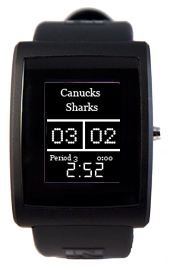
Hockey Scores app
Description
The perfect solution for keeping track of the hockey game when you're busy doing something else. The app works with your blackberry to get score updates from the web and then forwards the information to your watch. If someone scores, the watch lets you know by vibrating and giving a notification showing when the goal was scored and the updated score.
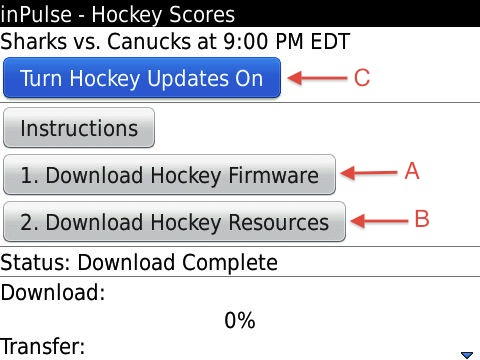
- Install the updated Inpulse Blackberry application:
- Download the blackberry app onto your phone using the link below.
- Reboot your blackberry.
- Transfer the required hockey watch firmware from the blackberry app.
- Make sure your phone is connected to the internet and your watch is paired with your phone.
- Go into the InpulseBB application on your blackberry. You can make sure the watch is connected properly by sending a test message. Go into the Hockey Scores menu option.
- The installation of the app to the watch is handled by the two download buttons on the Hockey Scores screen. Press Download Firmware (A) and wait for the transfer to finish and the watch to reboot, then do the same for Download Resources (B).
Once the watch reboots, your new firmware will be fully installed. Send a few test messages to make sure everything is working and you're ready to get game updates on your watch! The top line of the Hockey Scores screen shows which game is playing, and when (or the score if it has already started). Press "Turn Hockey Updates On" (C) to enable the updates. When the game starts, the watch will receive a notification signalling the game has started and the watch's clock will turn into a scoreboard. The app must stay open for updates to send. If you close the app accidentally, make sure you go back to Hockey Scores and enable updates again.
To go back to the regular watch firmware, use the Firmware option from the Inpulse Blackberry app main menu.